Test Latency to Azure Regions, if users feel your app is “slow,” as nine times out of ten they’re feeling latency, not CPU. In Azure, that latency comes from three very different paths: within a zone, across zones (same region), and across regions. Treat them differently and you’ll make better architecture calls—and avoid expensive rework.
Table of Contents
What Microsoft publishes (and how to use it)
Microsoft maintains round-trip latency statistics between Azure regions, based on continuous measurements over the Azure backbone. The data uses median (P50) round-trip times, with the current dataset covering a 30-day window and refreshed roughly every 6–9 months. Use these tables to shortlist region pairs for DR, active/active designs, and data replication strategies.

Source: Azure network round-trip latency statistics
Inside a region, Availability Zones are connected by a high-performance network. Microsoft’s target is “less than ~2 ms” RTT for inter-zone communication—good enough for synchronous replication in most enterprise workloads. Still, if your app is hypersensitive to latency, you should test your exact zones and protocols.
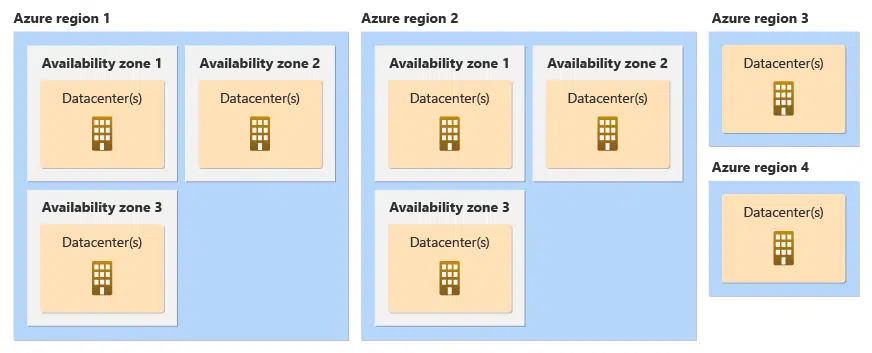
Source: Availability zones
Reality check: inter-zone latency isn’t identical everywhere
Don’t assume every region’s zones are equal. In some regions, one zone-to-zone path can be noticeably slower than another. If you’re building latency-critical stacks (databases, SAP, trading, gaming), measure before you commit your topology.
If you want to deploy an application across availability zones and it is latency critical, I recommend reading this guide “SAP workload configurations with Azure Availability Zones” and adjust for your application.
How I approach it in the field to test Latency to Azure Regions
Start with Microsoft’s data to test Latency to Azure Regions
Shortlist regions using the official round-trip tables (look at your candidate source region and scan its potential partner regions). This avoids guesswork based on geography alone. Source: Azure network latency
Prove inter-zone and in-zone latency in your tenant
Spin up test VMs and measure VM-to-VM latency with tools that reflect real application traffic (TCP/UDP)—not ICMP. Use Latte (Windows) or SockPerf (Linux) for clean RTT numbers that exclude application overhead. Read the full guide here.
Optimize placement when you need micro-latency
If one tier must be as close as possible (e.g., DB + app), use Proximity Placement Groups to co-locate compute in the same datacenter spine. Combine PPGs with Accelerated Networking; validate again after any SKU change. Check for more details here.
Check WAN Latency
For a pure latent test, it is best to go to a server at the location and call up the website https://www.azurespeed.com .
I have selected locations in Europe as examples and run them from the Stuttgart area from my private IP. When testing, make sure that you are in similar statistical areas, so it makes little sense to test China, USA and Europe at the same time, as the scale then becomes very coarse.

Here you can see why many companies opt for West Europe and not for the new zone in Frankfurt. Latency is only slightly better in Frankfurt, but the available functions are significantly limited.
The second is an example of latency to Asia from Stuttgart. Unfortunately, I don’t currently have a server in China to test whether I would want to go to Japan, Korea or Singapore, but this is a common question for organisations to avoide having IT infrastructure in China or use the China Azure options.

There is a second option Azure Speed Test 2.0 to use. Try this link to get a “second opinion”.

Check Latency within Availability Zones
If you are really looking into high performance and high available solutions within regions, than the latency can be tested using the “ Azure Network Latency Dashboard“.

The Azure Network Latency Dashboard visualizes Azure backbone measurements with practical filters (region, source AZ, destination AZ) and time windows (Last 72h, 7 days, 30 days). You can export CSV and inspect abnormal results. I treat it as a complement to Microsoft’s official numbers and my own Connection Monitor checks—perfect for quick “what’s moving right now?” analysis.
Conclusion
When choosing your Region to connect your locations, it is mostly about latency and the 2nd aspect to consider is the available products. Especially when you want to look into Previews, use all the newest products or very resource intensive ones (vGPUs) you might want to consider looking into the primary regions like West Europe and not i.e. the regional German datacenters.
If you have any questions please don’t hesitate to reach out to me on LinkedIn, Bluesky or check my newly created Adaptive Cloud community on Reddit.
LinkedIn: https://www.linkedin.com/in/andreas-hartig/
Bluesky: https://bsky.app/profile/hartiga.de
Adaptive Cloud community on Reddit: https://www.reddit.com/r/AdaptiveCloud/
This is an updated and enhanced version for my “Quickly test Latency to Azure Locations 2024” “version located here.