In the past, securing your Azure Virtual Machines (VMs) often felt like a trade-off between security and budget. If you wanted to avoid the risks of exposing RDP or SSH to the public internet, you had to deploy Azure Bastion. While excellent, the Standard and Basic SKUs come with a “fixed” hourly cost that can be hard to justify for small dev/test environments or personal labs. The Developer SKU is specifically designed for non-production workloads.
Table of Contents
When to Use Azure Bastion Developer
The Developer SKU is specifically designed for non-production workloads. It is my choice when I am running my personal or a new Dev/Test environment and I know I am only going to manage a single VM at a time.
There are additional limitations like that you should only be working within a single Virtual Network (VNet) and you do not require VNet peering.
If you are a developer or architect (like myself) looking for a quick, “zero-config” way to access a lab machine without setting up complex networking, this is the way to go!
Why to Use Azure Bastion Developer
When Azure Bastion initially was released it had significant costs associated to it and this lead to Azure Bastion not being the initial choice to use for smaller environments. With VPN Gateways becoming more expensive and we all do not expose RDP to the Public internet, this has changed with this free Azure Bastion Developer option.
After all Security should never be a hurdle and luckily with Azure Bastion Developer it is no longer. Here are the main advantages:
- Zero Configuration: Unlike other tiers, it doesn’t require a dedicated AzureBastionSubnet or a Public IP.
- Simplified Management: Microsoft manages the underlying infrastructure in a shared pool, meaning you don’t have a dedicated host to worry about.
- Portal-Based Access: You get secure RDP and SSH access directly through your browser using HTML5, keeping your VM’s ports closed to the outside world.
Costs Associated With Azure Bastion Developer
One of the biggest hurdles for small-scale projects has always been the price tag. Here is how the Developer SKU stacks up. The Hourly Charge is $0.00. Yes, the runtime cost for the Developer SKU is currently free!
Even for Data Transfer it is for free. This is unlike the paid tiers, which charge for outbound data transfer after the first 5GB, the Developer SKU is generally positioned as a free offering for these lightweight sessions.
You might actually save money if you can remove your public IP or downgrade from a higher level SKU
Important: Always check the latest Azure Pricing Calculator for regional variations, as cloud pricing models are always evolving.
How to Quickly Enable Azure Bastion Developer
Enabling the Developer SKU is significantly faster than the traditional “manual” deployment.
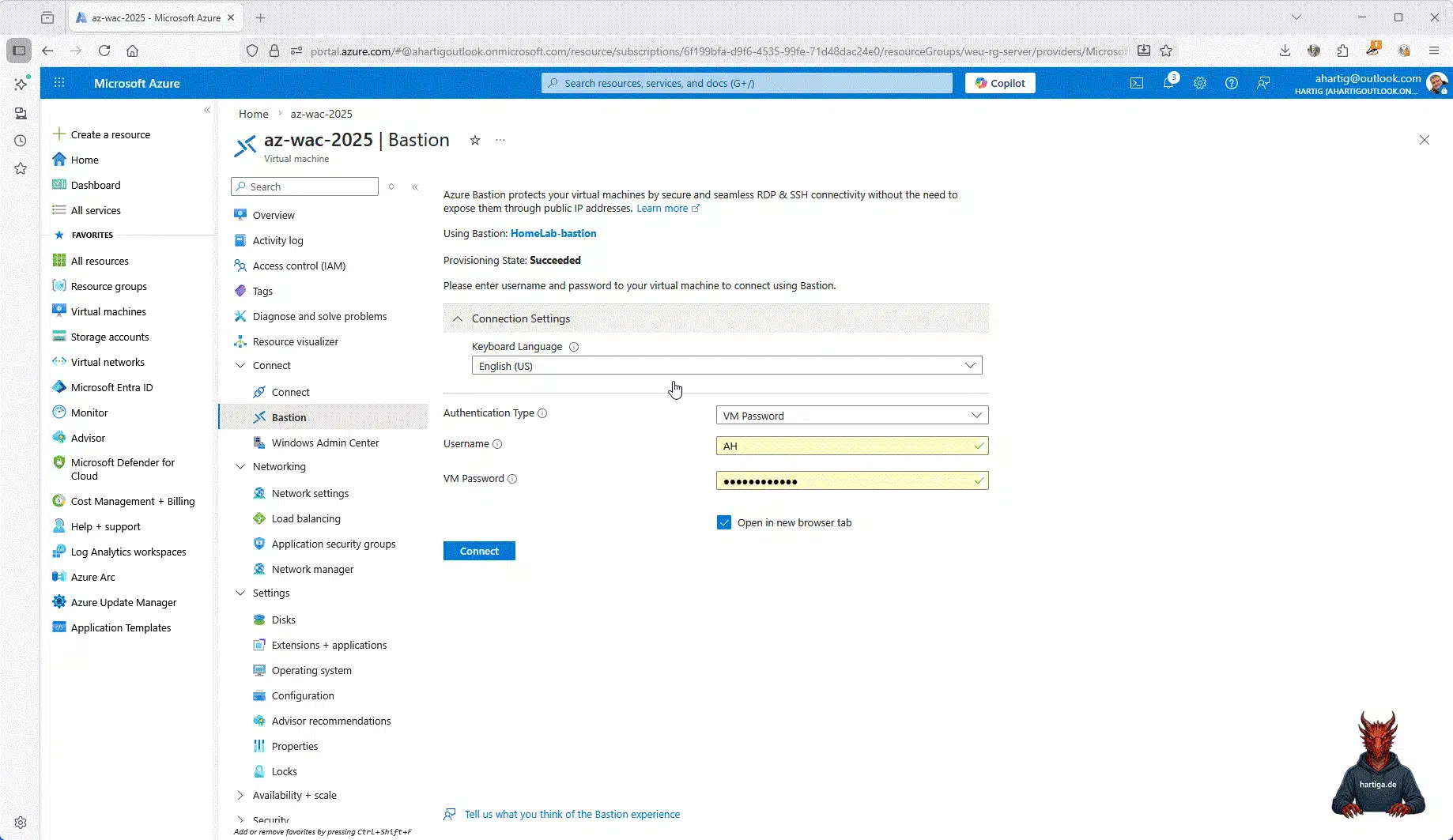
- Navigate to your Virtual Machine in the Azure Portal.
- Select Connect > Bastion.
- On the Bastion blade, ensure the Developer SKU is selected.
- Enter your VM credentials and click Connect.
- Azure handles the backend provisioning automatically. You’ll be in your session in minutes.
Check the Azure Availability for your zones first. Below is the current availability as of 2/2026

This is how the Azure Bastion Developer does look in my lab
The Limitations: When to Move Up
Obviously the free tier is about to get you started and addicted to HTML5 based RDP. You will need to move to the Basic or Standard SKU for the following reasons:
- Concurrence: You need more than one active session at a time.
- VNet Peering: You need to reach VMs in other peered VNets (a “Hub and Spoke” model).
- Native Clients: You want to use your local SSH client or RDP application instead of a browser.
- Advanced Security: You require session recording or IP-based connection.
Important: The Developer SKU uses a shared platform IP (168.63.129.16) to communicate. If you have very strict Network Security Group (NSG) rules that block all VNet traffic, you may find that the Developer SKU gets blocked because it doesn’t originate from a dedicated subnet. In those cases, the Standard SKU is your best bet for a “Production-grade” security posture.
Why Start Today?
In today’s threat landscape, leaving port 3389 or 22 open to the internet—even for a “quick test”—is asking for trouble. The Developer SKU removes the cost and complexity excuses. It allows you to build a “Secure by Default” habit in your development workflow without spending a cent of your lab budget.
Modernize your workflow today and protect your assets. Stop paying the “Bastion Tax” for your development environments, but get the required security levels.
The SKU was officially announced and entered Public Preview on October 30, 2023. At this initial stage, it was introduced as a lightweight, zero-configuration alternative to the Basic and Standard SKUs. However, it was restricted to a very small set of regions (primarily Central US EUAP, East US 2 EUAP, West Central US, North Central US, West US, and North Europe) to allow Microsoft to monitor the shared infrastructure model.
The service reached General Availability in May 2024. It was officially fully supported in very few selected regions. Its footprint was significantly expanded to 36 public regions in April 2025, making it a viable standard for developers globally in 2025 with this announcement.
Additional Resources
Quickstart: Deploy Azure Bastion from the Azure portal – learn.microsoft.com
Deploy Azure Bastion Developer SKU – learn.microsoft.com
Choose the right Azure Bastion SKU to meet your needs – learn.microsoft.com
Check this great video guide by the Azure Academy
Conclusion
After finalizing the modernized VPN Gateway Connection using this guide, we now have a secure connection using the free of charge Azure Bastion Developer SKU.
I should have started sharing and using this way earlier. There is nothing more to add.
If you have any questions please don’t hesitate to reach out to me on LinkedIn, Bluesky or check my newly created Adaptive Cloud community on Reddit.
LinkedIn: https://www.linkedin.com/in/andreas-hartig/
Bluesky: https://bsky.app/profile/hartiga.de
Adaptive Cloud community on Reddit: https://www.reddit.com/r/AdaptiveCloud/