Update: This guide replaces my original article located here with this VPN Ubiquiti UniFi UDM to Azure (2026 Edition). In the past, we relied on the Basic VPN Gateway and Basic Public IPs for a cost-effective home lab setup. However, with Microsoft retiring Basic SKU Public IPs retires Basic SKU Public IPs on September 30, 2025, that “budget” approach is no longer viable or supported.
To maintain a stable, supported connection today, we must use Standard SKU Public IPs and the VpnGw1 generation (or higher). While this increases the cost compared to the old Basic tier, it provides a significantly more robust connection, higher throughput, and better SLA guarantees—essential for a professional-grade home lab.
I use the Ubqiuti UDM Pro SE and am very happy with the cloud management, it’s visibility into my LAN and Wi-Fi, and the performance. I use the Azure VPN Gateway to connect certain services from Azure for testing, demo and training purposes. This is relatively easy to install and configure.

Table of Contents
Prerequisites
Before you begin, ensure you have the following:
- Azure Account: Active subscription.
- Ubiquiti Console: UDM Pro, SE, or Cloud Gateway Max running the latest UniFi Network Application (8.0+).
- Public IP (Home): A public IPv4 address for your UDM. If you have a dynamic IP, ensure you have a Dynamic DNS (DDNS) hostname configured.
- Budget: Be aware that the VpnGw1 SKU and Standard Public IP incur higher monthly costs than the old Basic setup. Check the Azure Calculator.
Create the Azure Resources
There are many AI generated overviews and step by step guides. From my experience these do not work or have flaws, so I do take a slightly different approach with more details in my guide.
Virtual Network (VNet) – my approach
In my Azure environment I always do start with a Resource Group weu-rg-network (Germany West Central)
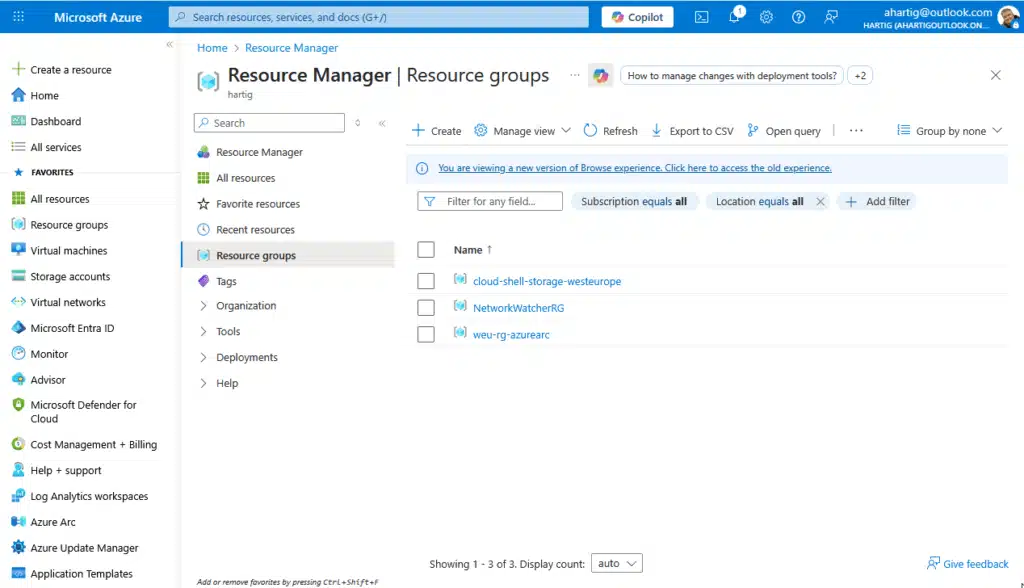
To support my Use cases I do create 4 Subnets to start with and my personal Home / HomeLab LAN design uses 10.0.0.0/8 for Azure, 192.168.0.0/16 for Home and Homelab and the 172.16.0.0/12 is used for special use cases (Routers / DMZs / …).
- Default 10.0.0.0/24
- Server 10.0.2.0/24
- Gateway Subnet 10.0.3.0/24
- AzureBastionSubnet 10.0.4.0/24
Information: I recommend following the guidance about private IPs from RFC1918 and RFC3300.
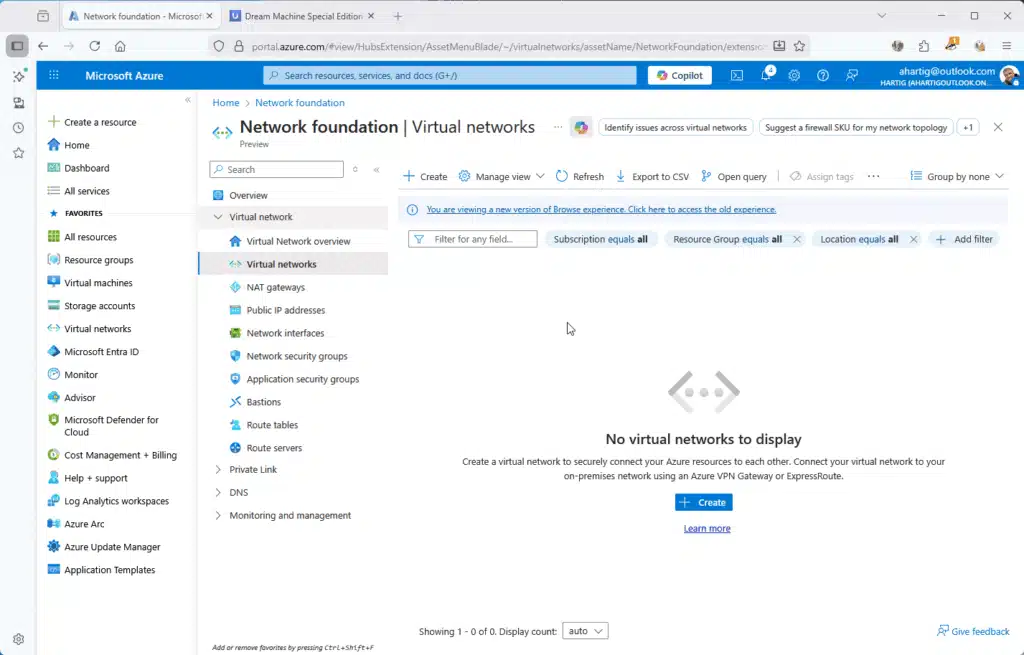
Gather Home – HomeLab Network Details
In my Home Network I will make the networks 192.168.0.0/24, 192.168.1.0/24 and 192.168.2.0/24, so we need to have a routing in place between these networks.
Private Network 192.168.0.0/24
Server Network 192.168.1.0/24
IoT Devices 192.168.3.0/24

Azure Virtual Network Gateway (VPN Gateway using Hybrid Preview)
Enter “VPN Gateway” in the search bar and select it from the results. Doing this from the market place sometimes leads to 3rd party choices, which can create extra costs. I will be using the Hybrid Connectivity Preview for this guide.
- Name:
weu-vpn-gw - Region: West Germany (same as your VNet that you created earlier)
- Gateway type:
VPN - SKU: Select VpnGw1AZ
- Virtual Network: HomeLab (same as your VNet that you created earlier)
- VPN type:
Route-based
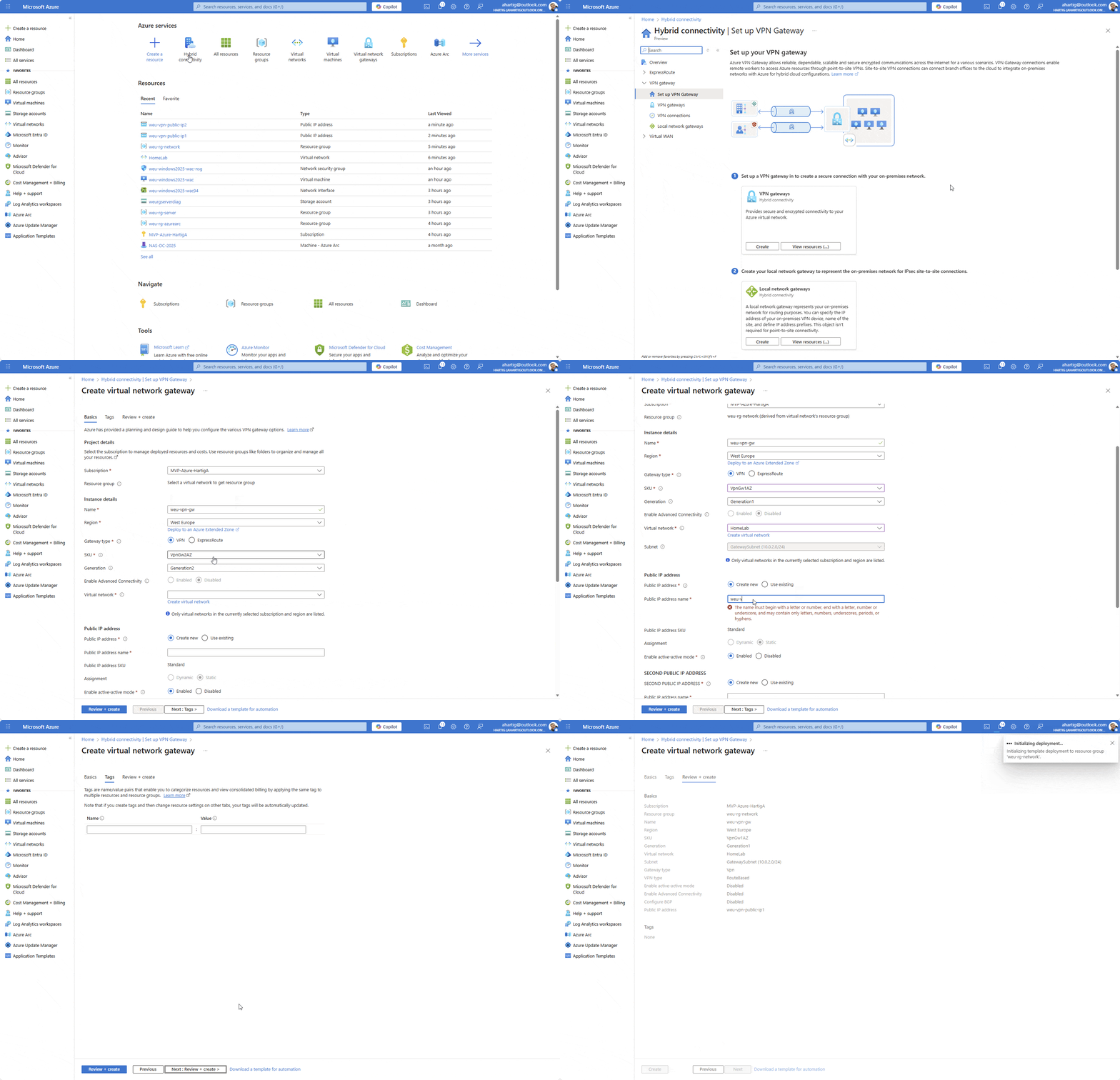
Information: Deployment can take 20–60 minutes. Grab a coffee. I have also seen this time frame if you are updating the VPN Gateway SKU. So always verify your settings carefully, before executing the deployment.
See below for a high level architecture overview of the VPN Gateway Design.

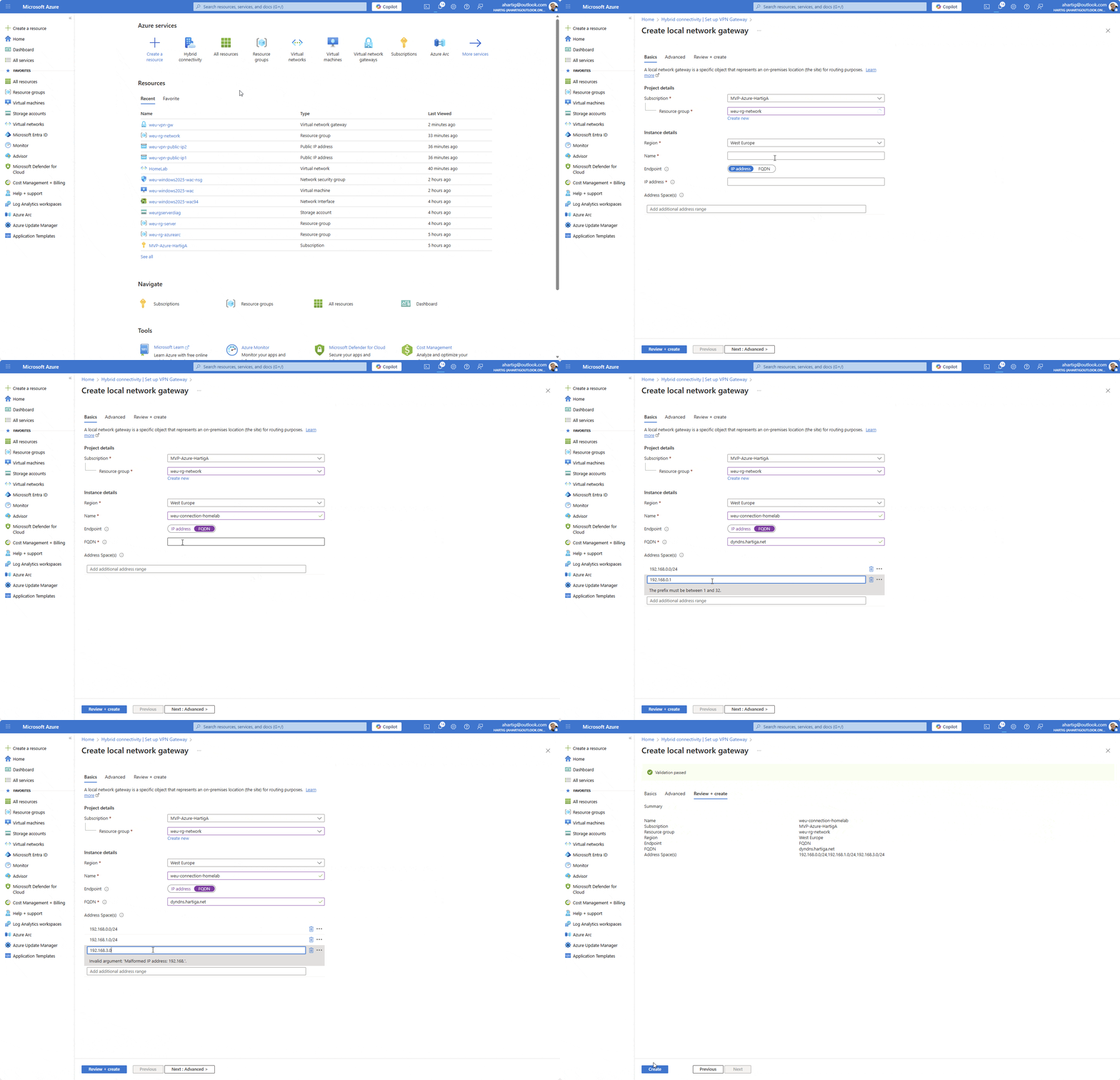
Configure Local Network Gateway in Azure
Enter “VPN Gateway” in the search bar and select “Hybrid connectivity” from the results. Click on Set up VPN Gateway and choose “create” in the Local Network Gateways box.

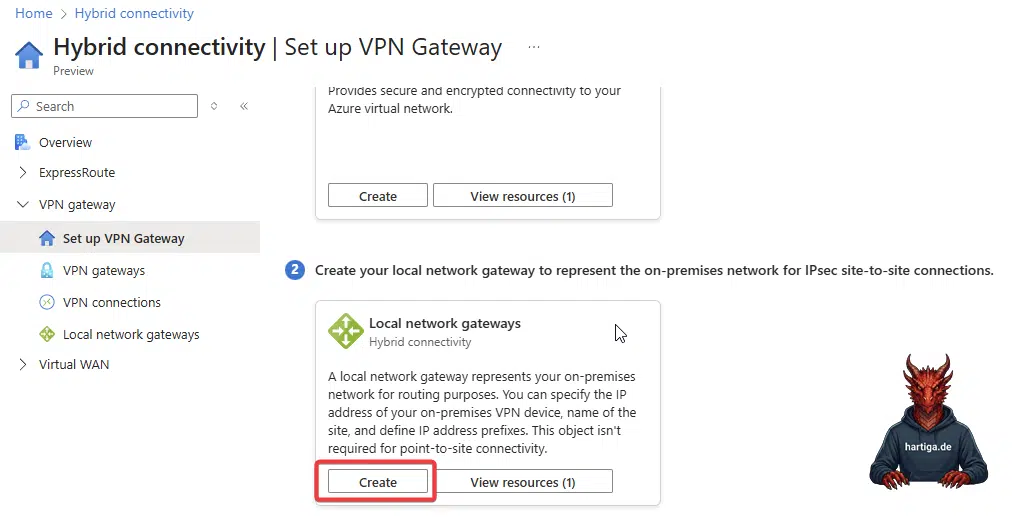
- Resource Group: weu-rg-network (or the one you initially created)
- Name: weu-connection-homelab (choose your name, but i use region + connection + the site i connect to
- IP or FQDN: if you have a static IP use that one here or use a dynamic DNS name from for example https://www.noip.com/
Configure VPN connections in Azure
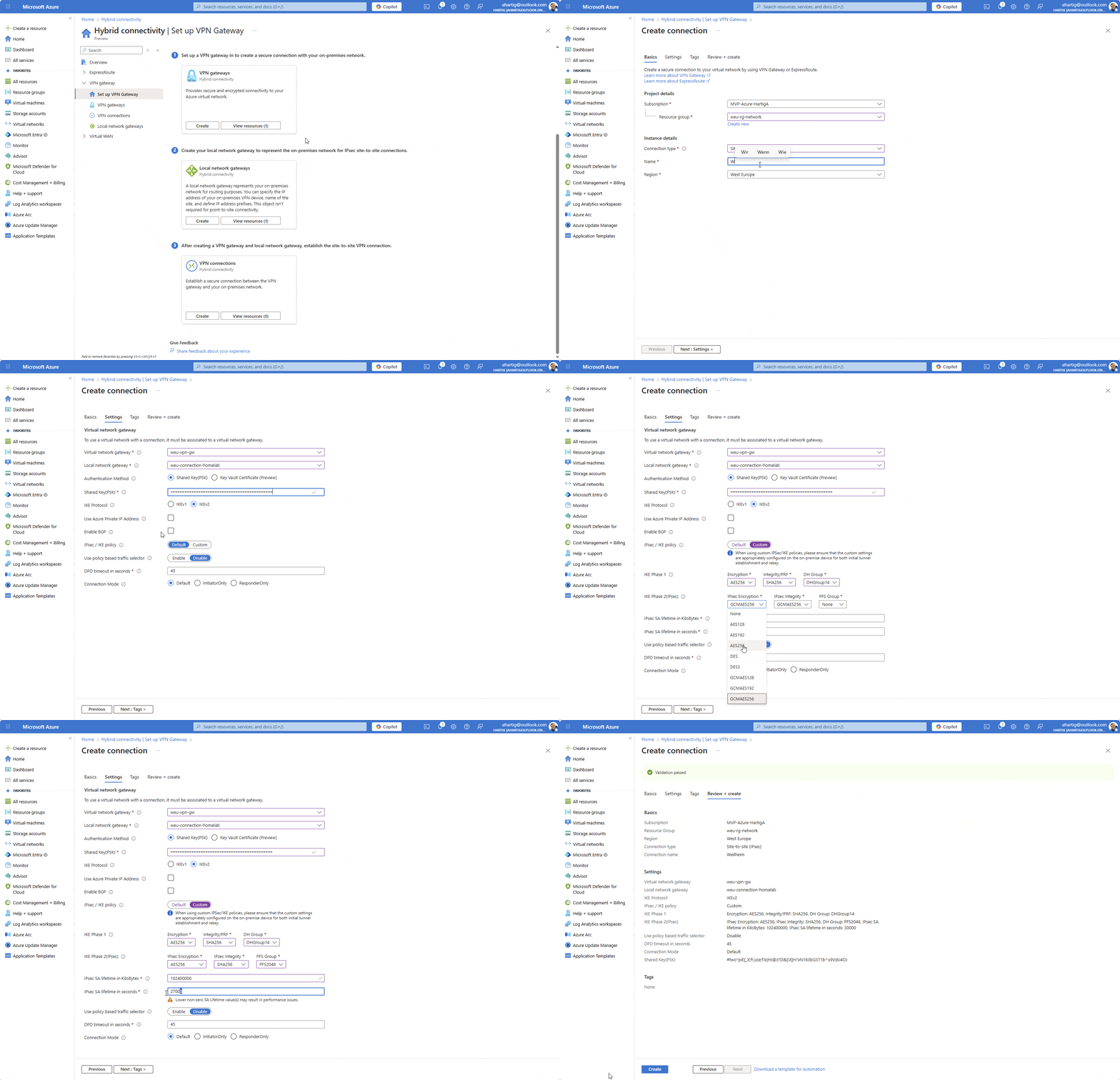
Enter “VPN Gateway” in the search bar and select “Hybrid connectivity” from the results. Click on Set up VPN Gateway and choose “create” in the VPN connections box.
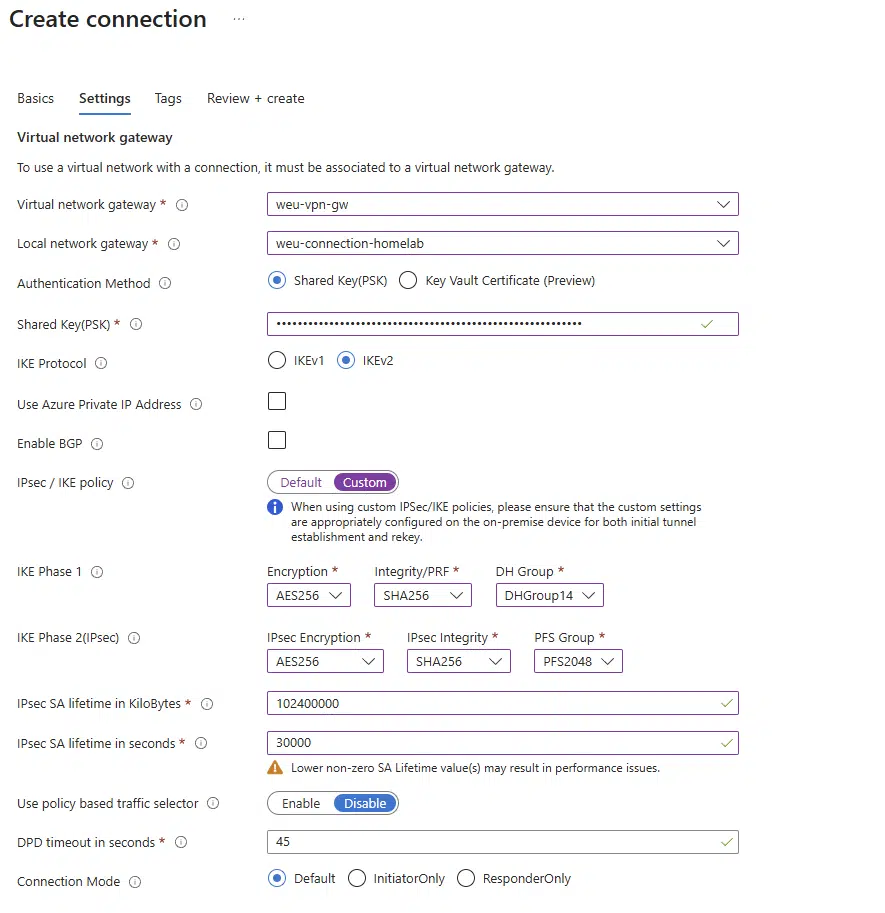
The settings are straight forward and I recommend to watch the animated gif below. For the IPsec / IKE policy select custom and use the settings below.
IPsec / IKE policy: Select Custom.
- IKE Phase 1:
- Encryption:
AES256 - Integrity:
SHA256 - DH Group:
DHGroup14
- Encryption:
- IKE Phase 2 (IPsec):
- Encryption:
AES256 - Integrity:
SHA256 - PFS Group: PFS2048 (This is Azure’s label for Group 14).
- SA Lifetime (Seconds):
28800(Microsoft default). - SA Lifetime (KB):
2147483647(Max Integer).
- Encryption:
Information: Azure may show a warning that lower non-zero values can cause performance issues. Don’t lower these unless you have a specific interoperability requirement.
Ubiquiti UniFi Configuration
Now we configure UniFi to match the Custom Policy we just created in Azure exactly.
Site to Site VPN
Log in to your UniFi Network Application and Navigate to Settings > VPN > Site-to-Site VPN to click Create New.

Static Routing to VPN Ubiquiti UniFi UDM to Azure
Go to your Unifi Network Settings and click on Overview and from there Policy-Based Routing or search the settings for static routes.

Make sure you choose the right WAN interface and IP Subnets for this to work.
Information: Having the IKE Keys and the Shared Key(PSK) identical is critical for this configuration to work. A simple mismatch will break your connection.
Conclusion on VPN Ubiquiti UniFi UDM to Azure
While we miss the low cost of the Basic SKU, the move to Standard IPs and VpnGw1 ensures our labs are running on enterprise-grade infrastructure. It’s more expensive, but it’s reliable, future-proof, and aligns with the production environments we manage daily.
Please make sure you run the numbers for the costs through your Azure Calculator. I would expect between 150 – 250 USD per month (25.01.2026) to VPN Ubiquiti UniFi UDM to Azure.
If you have any questions please don’t hesitate to reach out to me on LinkedIn, Bluesky or check my newly created Adaptive Cloud community on Reddit.
LinkedIn: https://www.linkedin.com/in/andreas-hartig/
Bluesky: https://bsky.app/profile/hartiga.de
Adaptive Cloud community on Reddit: https://www.reddit.com/r/AdaptiveCloud/
Additional Resources
About VPN devices and IPsec/IKE parameters for Site-to-Site VPN Gateway connections