Designing and documenting Active Directory (AD) structures is always a long and complex exercise. Historically, this required either building full lab environments or settling for static Visio diagrams that became obsolete the moment they were saved.
While the Microsoft Active Directory Topology Diagrammer (ADTD) served its purpose for years, it no longer fits the demands of a modern, fast-moving IT landscape.
Table of Contents
Introduction to Active Directory Visualization
Active Directory remains the backbone of enterprise identity, yet the way we architect and document it often feels stuck in the early 2000s. For years, the industry standard was a reactive approach: build the infrastructure first, then use a tool like the Microsoft Active Directory Topology Diagrammer (ADTD) to figure out what was actually created.
In today’s landscape, where identity is the new security perimeter, the cost of a poorly designed Organizational Unit (OU) structure or a flawed tiering model is higher than ever. Architects need the ability to iterate on designs before they ever touch a production Domain Controller. We need to shift from passive discovery to intentional, visual-first design.
This article explores how we can bridge that gap. By leveraging community-driven tools that prioritize agility and human-readability over legacy dependencies, we can create documentation that is both accurate and useful for stakeholders. We will look at why it is time to move beyond the limitations of static diagrams and how simulation can lead to more resilient identity architectures.
Technical Deep-Dive: MockAD and md2ADUC
Modern AD architecture rarely starts in production. It starts on a whiteboard, in a workshop, or in a design session. Standing up Domain Controllers just to validate an OU structure is unnecessary overhead that slows down the creative process.
MockAD: The Lightweight Simulator
MockAD is a standalone tool that replicates the look and behavior of Active Directory Users and Computers (ADUC) without requiring any actual Windows Server infrastructure.
- Structured Design Workflow to build domains, OUs, users, groups, and even gMSA accounts using a familiar tree-based interface.
- Interactive Editing so objects can be reorganized via drag-and-drop, and standard shortcuts like copy and paste work as expected.
- Embedded Documentation for each object it supports Markdown descriptions, allowing you to document the why behind a structure directly alongside the object itself.
The community project can be found here: https://github.com/shokkadev/MockAD-Release
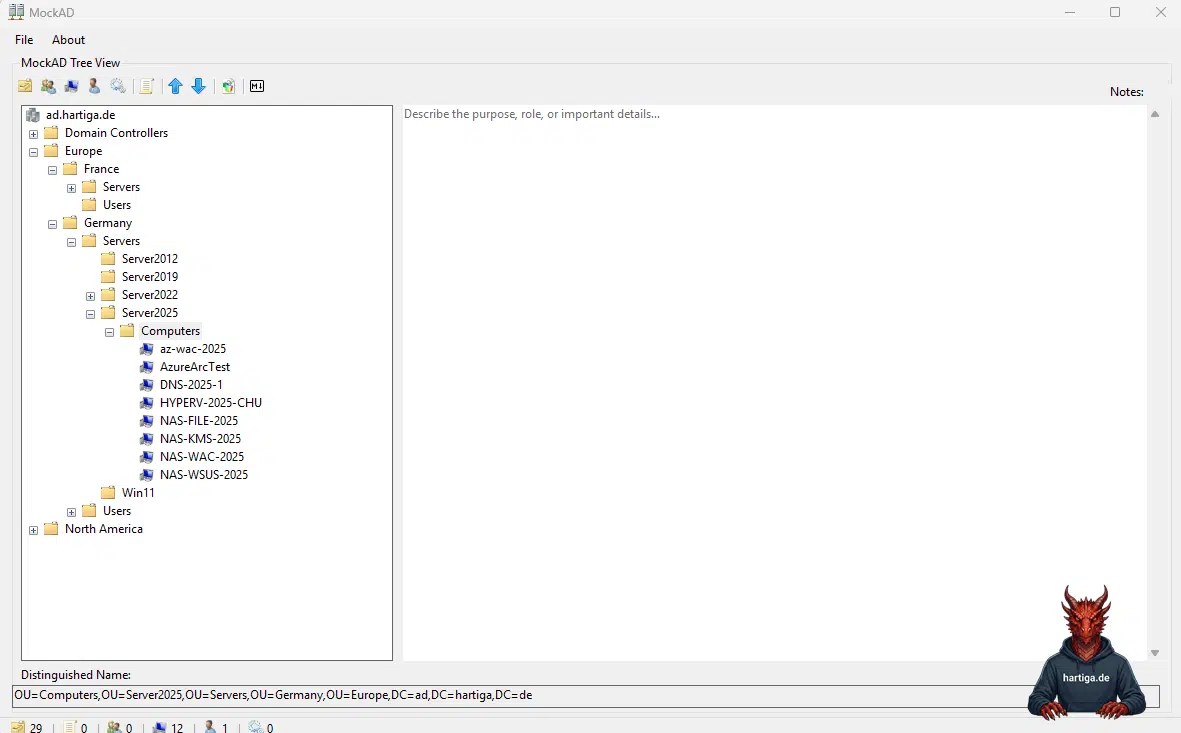
.\MockAD-Dump-Prod.ps1 -OutputPath ".\output.json" -IncludeUsers -IncludeGroupMembers -IncludeGroups -IncludeComputersImportant: The PowerShell integration in MockAD is designed for maximum safety. It uses a dedicated script to perform a read-only export of your existing OU and object hierarchy into a local JSON configuration file. This file acts as a static snapshot. By importing this JSON into MockAD, you can simulate changes to your real-world environment in a completely isolated “sandbox” state, ensuring you never touch live production data while brainstorming.
md2ADUC: Documentation at Speed
Where MockAD focuses on simulation, md2ADUC focuses on communication. It is a browser-based tool that converts Markdown text into a visual representation of ADUC.
- A Simple Input Model to help you define your structure as an indented Markdown list.
- It comes with Instant Visualization. The tool renders this list into a realistic Windows-style interface, including appropriate icons for users, computers, and OUs.
- Export-Ready Output for you to export high-resolution images suitable for architecture boards or project handbooks with one click.
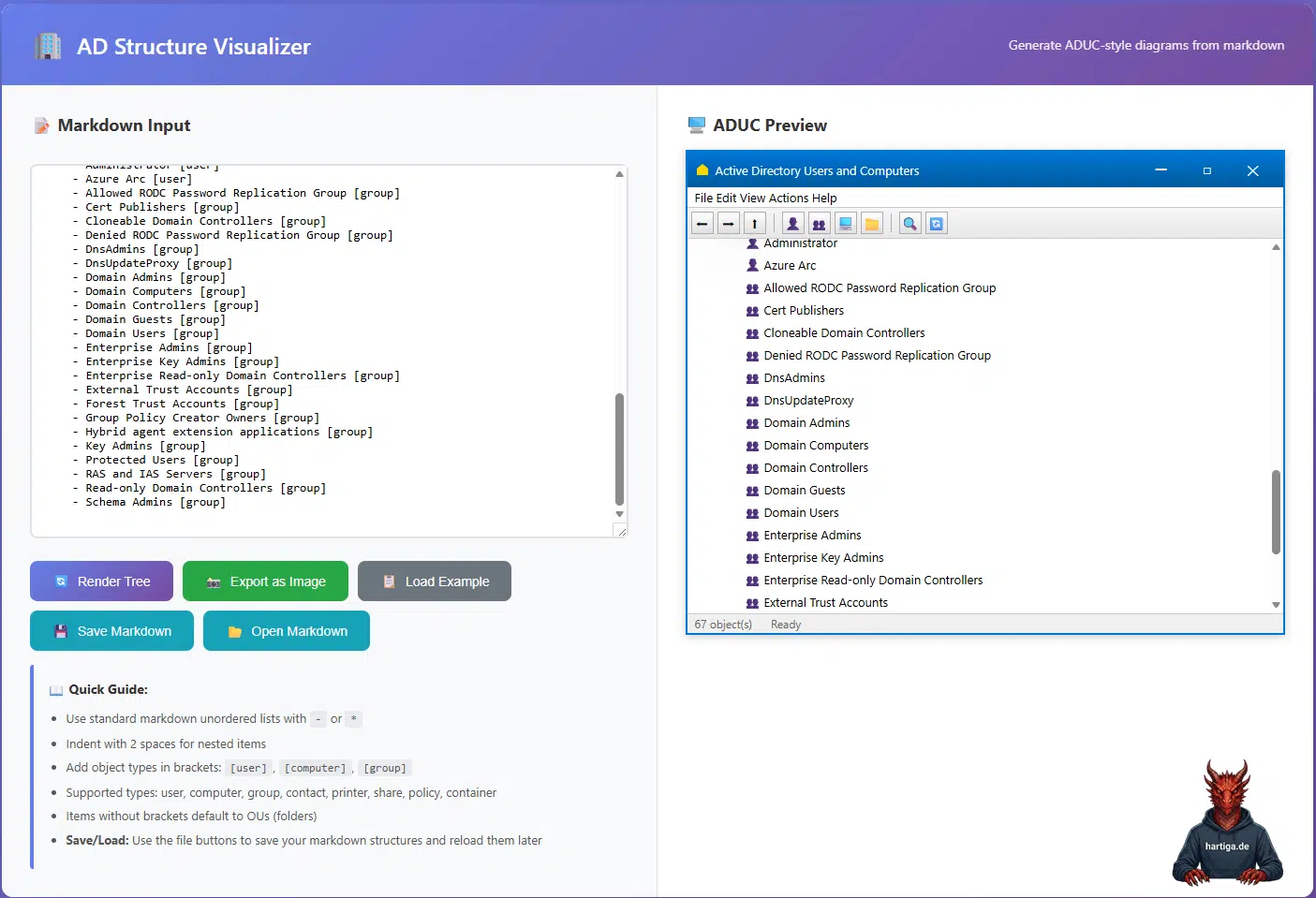
The community project can be found here: https://github.com/JimSycurity/md2ADUC and there is also an AD to markdown scripts to generate an input file for your existing Active Directory structure. https://github.com/JimSycurity/md2ADUC/tree/main/AD2Markdown
.\Export-ADStructureToMarkdown.ps1 -ExcludeSystemContainers -OutputFile "ad.hartiga.de.md"Comparison: Why Modern Tools Outperform ADTD
The Microsoft Active Directory Topology Diagrammer (ADTD) was a strong tool in its time, but it is fundamentally limited by its original design assumptions.
ADTD depends on a live AD environment to generate diagrams. MockAD and md2ADUC enable greenfield design, letting you define what should exist rather than just documenting what is already there.
IT relies on Microsoft Visio and legacy .NET components, which often lead to compatibility issues in modern environments. md2ADUC avoids this entirely by running in a browser.
The Active Directory Topology Diagrammer diagrams often become unreadable in large environments. In contrast, MockAD and md2ADUC enforce a clean, hierarchical representation that is easier for humans to digest and discuss.
My recommendations for Active Directory Visualization
For me the biggest challenge in AD redesigns is not the technology itself, but safe visualization and clear communication with stakeholders.
I use use MockAD for Design and Iteration. It helps me to defining new tiering models or restructuring OUs. MockAD provides a safe playground. Experiment freely without risk to production and iterate quickly based on feedback, but the ability to import the existing topology as a starting point.
When it comes to communication I use md2ADUC. It works better for high-level presentations or documentation where I need my audience to recognize the context instantly. For me md2ADUC delivers clean and familiar visuals without the clutter of a lab.
I have seen ADTD run on Virtual Machines running End of Life OS and MS Office versions. I would utilize other options to connect such systems with my Active Directory.
Conclusion on Active Directory Visualization
Moving away from legacy tools like ADTD is always difficult. The new tools are not like for like replacements. When designing designing a new forest, refining a tiering model, or documenting an existing environment, MockAD and md2ADUC provide the flexibility and speed that traditional approaches lack.
I assume there is more demand for such tools, so I am confident there are more tools to help with Active Directory Visualization out there. If you know any, please get in touch with me.
If you have any questions on the topic of Active Directory Visualization please don’t hesitate to reach out to me on LinkedIn, Bluesky or check my newly created Adaptive Cloud community on Reddit.
Please also check my guides on deploying Active Directory on Windows Server 2025.
LinkedIn: https://www.linkedin.com/in/andreas-hartig/
Bluesky: https://bsky.app/profile/hartiga.de
Adaptive Cloud community on Reddit: https://www.reddit.com/r/AdaptiveCloud/
My YouTube Channel: https://www.youtube.com/@hartiga