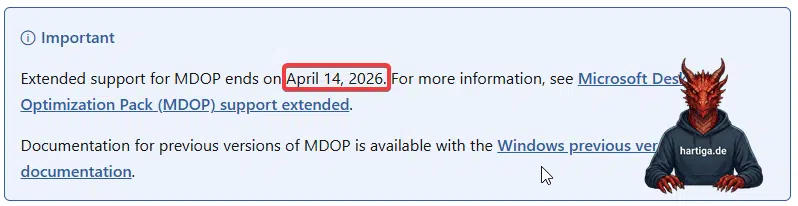
AGPM is End of Life on 14 April 2026. Microsoft’s Advanced Group Policy Management (AGPM) reaches its official End of Life (EOL) on April 14, 2026. After this date, the tool that provided the “safety net” for Group Policy edits will no longer receive security updates, bug fixes, or compatibility guarantees.
For some of us, this isn’t just a minor software retirement; it’s a hard stop in the lifecycle of classic GPO management. If you are still using AGPM to backup, restore and have versioning of GPOs in your production environment, you need a plan today.
Table of Contents
What was AGPM and why did it matter?
AGPM solved a fundamental design flaw in Group Policy. There was no change management, versioning and ultimately a lack of ownership on changes. In standard GPMC, hitting “OK” means the change is live in production immediately. AGPM introduced a crucial layer of governance by introducing:
- Change Control and check-in/check-out functionality to prevent concurrent edits.
- Versioning and the ability to roll back to a known good state.
- The delegation control over who can edit versus who can deploy.
- An approval workflows with a formal “four-eyes” principle for policy changes.
Check my articles covering the basics around AGPM before learning more about how to deal with AGPM is End of Life.
Microsoft’s Stance: Is there a replacement?
The short answer is No. Microsoft has not announced an “AGPM vNext” or a built-in replacement for Windows Server. The official strategy is to move towards Intune, Cloud Policy, and Entra ID. While this makes sense for a cloud-first world, it leaves a significant gap for those of us maintaining robust on-premises or hybrid infrastructures in 2026.
Modern Replacement Options
If you need to fill the gap left by the fact that AGPM is End of Life, you generally have three paths depending on your organizational maturity and budget.
Path 1: The “Replace AGPM” Mindset (Same Workflow)
These tools are designed to provide the same governed change control system you are used to. With these tools you keep the same operating model, just with better technology.
- Quest GPOADmin – From my perspective still the benchmark for full lifecycle management. It provides the closest true AGPM replacement with robust approval, versioning, and auditing.
- FullArmor Universal Policy Administrator (UPA) – A modernized approach to classic AGPM-style governance. It offers centralized management across multiple domains and clouds but keeps a tool-centric model.
If AGPM is still being heavily used for versioning and control in your environment, then looking into these two options is most likely the way to go. The solution by Quest would be my safe bet, but if I would want to look into a modern multi Active Directory Forest design solution, I would try out FullArmor UPA. If you have any experience on FullArmor UPA, i would be interested to hear about it.
Path 2: The “Expand AD Control” Mindset (Bigger Platform)
With these tools, you want to change your GPO management to be a part of a larger security and administration suite. You might want to check with your CISO if he is interested in this approach or you might already use the ManageEngine ADManager Plus in your organization and want to extend it to manage the GPOs.
- Cayosoft Guardian is a security-first angle. Instead of just focusing on workflows, it prioritizes real-time monitoring, automatic rollback, and security enforcement to detect unauthorized changes.
- ManageEngine ADManager Plus is a broad operational suite. While it offers GPO management, reporting, and delegation, it acts more as a general administration tool than a specialized GPO lifecycle system.
Having worked with ManageEngine ADManager Plus this would be my first choice, if i would want to manage AD with a single control plane and add GPOs into the same toolkit. Cayosoft Guardian would be new to me, but it looks very modern and has a unique change management overview.
Path 3: The “Rethink Everything” Mindset (my modern approach)
This is the modular, scriptable, and composable path that aligns with my mindset and the cloud and automation era. If you are hardly using AGPM and you want to consider GPOs a component of your devops approach, I would simplify the use cases and automate it using the following tool sets.
- Git + PowerShell (GPO-as-Code) is my “vNext” model. You export GPOs, commit them to Git, and use Pull Requests for approvals. This scales with DevOps and provides real version control. You are trying to not make any changes in the GUI, but only work with the automation components to backup, restore and associated GPOs using powershell.
- GPOZaurr and Microsoft Policy Analyzer are the tool set for your team. GPOZaurr provides best-in-class analysis to find broken or duplicated GPOs, while Policy Analyzer serves as an advanced troubleshooting and comparison engine for your baseline validation.
Replacing AGPM – My recommendation
AGPM is End of Life. Don’t simply look for a tool that looks like AGPM. The operating model has changed. In 2026, managing GPOs in isolation is a mistake.
- Focus on Identity Governance – Your GPO strategy must align with your user and identity governance. Use tools like Cayosoft or Quest that can bridge the gap between on-prem and cloud. Involve your Security Teams to get a common understanding of how AD, GPOs and cloud identities can be managed in a secure way using a single control plane
- Adopt DevOps mindsets where you can. If your team has even moderate automation capabilities, a GPO-as-Code approach will outperform any traditional MMC-based tool in auditability, traceability, and long-term maintainability. It provides a better audit trail and integrates into modern DevOps workflows.
- Modernize, Don’t Just Replace. Use the EOL of AGPM as a catalyst to clean up your GPOs. If you haven’t reviewed your policy bloat in years, now is the time to consolidate and modernize what you can.
You should manage GPOs using the same tools like Infrastructure or Active Directory, if you can. Now is the time to start with that approach.

Replacing AGPM – AI compares the option
As an additional perspective, I used AI tools to visualize the landscape. This is where I would start, so please feel free to use this as your starting point, if you want to analyze your replacement options for AGPM.
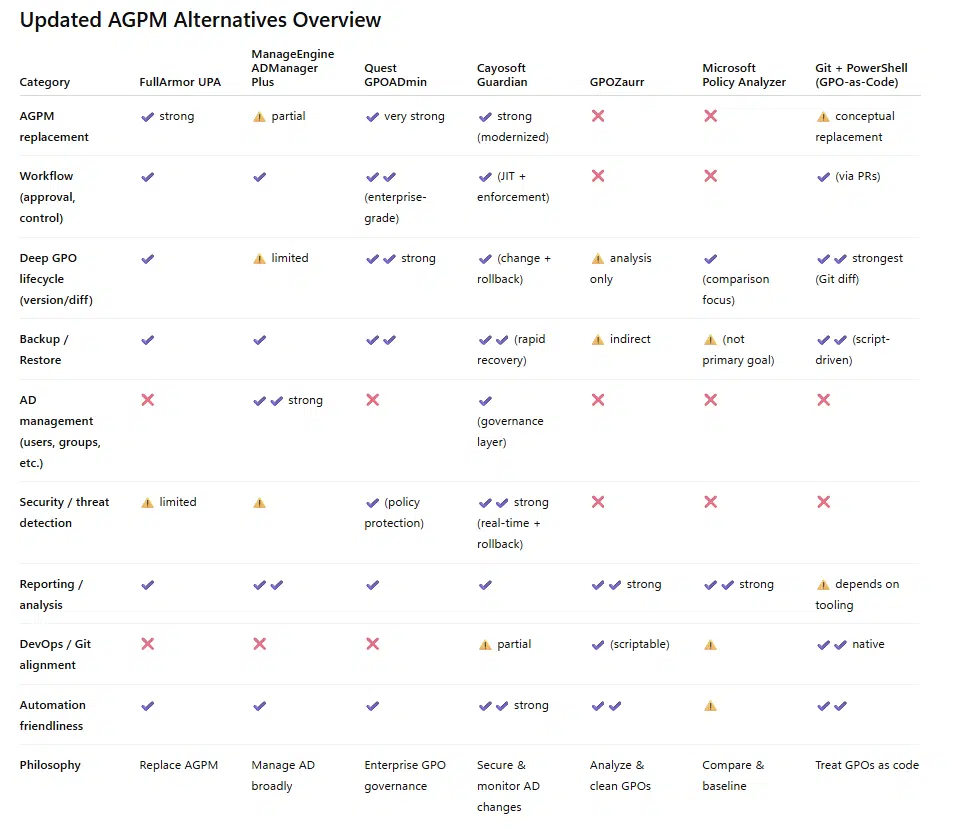

The quality of those two versions from ChatGPT and CoPilot differentiate a lot. I still left both options for reference purposes here, but I would start with the ChatGPT version.
Conclusion on AGPM is End of Life
AGPM is End of Life. It didn’t die because it failed. It is now End of Life, because the world moved toward more integrated, automated governance. There is no single successor option for AGPM. Instead, there are three competing philosophies. The real decision you face is whether you want to replace AGPM or leave the AGPM model behind entirely.
The transition away from AGPM is your opportunity to move from a reactive backup and approval workflow mindset to a single control plane or modern dev ops mindset.
If you have any questions on AGPM is End of Life please don’t hesitate to reach out to me on LinkedIn, Bluesky or check my newly created Adaptive Cloud community on Reddit.
LinkedIn: https://www.linkedin.com/in/andreas-hartig/
Bluesky: https://bsky.app/profile/hartiga.de
Adaptive Cloud community on Reddit: https://www.reddit.com/r/AdaptiveCloud/