If you spend enough years in IT operations and Windows Patching, you eventually reach a moment of clarity. You realize that Windows patching is not a technical problem. It is an organizational one.
Table of Contents
Windows Patching – Exceptions and Governance
Technically speaking, we solved patching a long time ago. Whether you are leaning on WSUS, Microsoft Configuration Manager (MECM), or Windows Update for Business (WUfB)—the tooling exists, and it works. The “how” is documented. The “why” is obvious.
The real friction always appears somewhere else: Exceptions
The moment exceptions enter the conversation, patch management stops being a technical process and transforms into technical debt, governance and risk management. This is where most organizations trip up. They treat a risk decision like a technical debate.
Windows Patching – What IT Operations Does (And What It Doesn’t)
In a mature architecture, Operations is responsible for the “machinery.” We provide and maintain the patching platform. This means we ensure:
- Deployment: Updates are pushed and available.
- Windows: Maintenance windows are defined and functional.
- Automation: Systems reboot automatically to finalize the installation.
- Reliability: The process is consistent and measurable.
- Monitoring: KPIs and nearly real time visibility
What we do not do is negotiate with application teams about whether their server “feels like” receiving a security update this month. That is not an operations discussion; it is a risk decision.
My rule #1 – If You Don’t Want Patches, Talk to the CISO
Legacy applications, poor vendor design, or messy operational realities exist. Deciding to leave a system unpatched is a security risk, not a technical preference.
My rule is simple. If you want to exclude a system from the automated patch cycle, you aren’t asking Operations for a favor; you are requesting a Security Exception.
That discussion belongs with the CISO and the security organization. The system owner must justify why the risk of an unpatched vulnerability is acceptable compared to the risk of a reboot. Operations simply executes the state defined by Security.

My rule #2 – Exceptions Must Expire
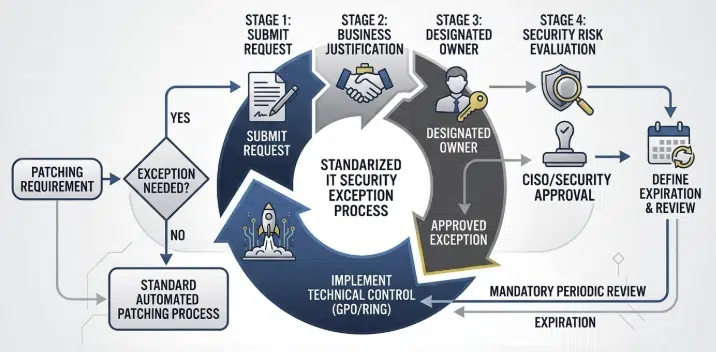
A security exception is not a “set and forget” configuration. To maintain a clean environment, every exception needs:
- A documented business justification.
- A designated system owner.
- A hard expiration date.
- A mandatory regular review.
Crucially, Operations does not perform this review. The system owner and IT Security must manage and validate the risk periodically. Our job is to ensure patching works everywhere it is supposed to work.
What I hate the most – This system requires manual Windows Patching
Things go south quickly when systems require “manual love” during a patch cycle. We’ve all seen them: servers that need a manual login after a reboot, databases requiring post-patch schema tweaks, or clusters that don’t failover properly without human intervention.
Every manual step is a failure of modern architecture. Manual patching leads to:
- Higher failure probability
- Bloated maintenance windows
- Unnecessary operational overhead
- People working after hours and on weekends
- Very often only one person can patch the system
If a system cannot handle an automated reboot/patch cycle, it is an operational risk. In many cases, the correct conclusion isn’t “patch it manually”, but it’s “fix the application architecture.”
My rule #3 – No Manual Reboot Policies
One of the most common (and annoying) requests is: “Please do not reboot this server automatically.” Without automated reboots, patches remain in a pending state, maintenance windows lose their meaning, and compliance reporting becomes a lie. Systems must reboot inside their maintenance windows. If someone needs to disable this, they need joint approval from Operations and Security Management. Preventing a reboot creates exposure, plain and simple.
My rule #4 – Create proper documentation
Governance is only as good as its documentation. Don’t hide exceptions in a GPO and call it a day.
Use existing tools and processes within your IT Security and risk management organization. This could be something like:
- The CMDB is your source of truth. It should show if an exception exists, who approved it, and when it expires.
- You can use a Ticketing System with a workflow (Request -> Security Evaluation -> Approval) that must be traceable for any audit.
- GPOs/Update Rings: These are the technical implementation of a decision made elsewhere. They are not the documentation itself. In combination with a simple Excel register, this can serve as a temporary fallback.
My rule #5 – Make Exceptions Painful
One of the most effective principles in IT governance is making the right path the easiest path. This is also true for Windows Patching.
The standard process must be seamless and automated. Exceptions must require effort. If getting a patch exception is as easy as sending a quick email, you will end up with hundreds of them. If it requires formal risk documentation, management sign-off, and quarterly reviews, suddenly application owners find a way to make their systems patchable.
Emergency Windows Patching – when the normal process stops
Every rule described above applies to normal patch cycles. But there are moments when normal cycles are irrelevant.
Anyone who worked through incidents like Log4Shell, PrintNightmare, or actively exploited Remote Code Execution vulnerabilities knows what that looks like. Security calls. There is an emergency change. Patch windows suddenly become much shorter.
In those moments you quickly learn whether your environment was designed for automation or built on fragile manual procedures.
Emergency patching becomes absolute chaos if systems depend on manual patching steps. If a server requires someone to log in after every reboot, run scripts, restart services manually, or execute vendor procedures, your emergency response slows down dramatically. Instead of pushing patches across the environment, you suddenly depend on individual people, documentation that may or may not exist, and late-night troubleshooting.
That is exactly why manual patching is so dangerous.
A vulnerability that could normally be mitigated within hours suddenly turns into a multi-day effort. Security is pushing for immediate remediation while Operations is trying to coordinate manual work across dozens or hundreds of systems.
Emergency patching should be a technical deployment problem, not a human coordination exercise.
Important: Environments that avoid manual patching survive emergency situations. Environments that depend on it turn emergency patching into operational hell.
My real world experience – This needs immediate attention
Another pattern appears in almost every environment for Windows Patching. The teams asking for patch exceptions are usually the same teams that escalate immediately when a vulnerability becomes public. Suddenly the same system that “cannot be rebooted this month” must be patched within hours because security scanners or auditors start asking questions. That contradiction is exactly why patch governance must exist. Exceptions must be documented, approved, and owned. Otherwise IT Operations ends up firefighting someone else’s risk decisions.
Summary
One important clarification is worth stating explicitly. Running a Windows server environment is never the responsibility of a single team. It is a shared effort between IT Operations, IT Security, and the Application Owners.
If one of these roles is missing or unclear, patching quickly turns into chaos.
Operations provides and runs the platform that keeps systems patched and operational. Security evaluates vulnerabilities and determines whether risk is acceptable. Application owners are responsible for ensuring their workloads can operate within that environment.

If you have any questions please don’t hesitate to reach out to me on LinkedIn, Bluesky or check my newly created Adaptive Cloud community on Reddit.
LinkedIn: https://www.linkedin.com/in/andreas-hartig/
Bluesky: https://bsky.app/profile/hartiga.de
Adaptive Cloud community on Reddit: https://www.reddit.com/r/AdaptiveCloud/
AI statement: My content is created by me and validated with AI technology. Graphics are mostly AI generated and verified by me.