Azure Feeds – all your RSS Feed Updates

A little tip for the RSS fans and bookworms among us for the weekend: Azurefeeds.com collects lots of articles in one place for your RSS Feed.

As described in an German article a while back, I am currently using Feedly to collect my articles on the World Wide Web. This week I stumbled across a website that I have been using ever since as it consolidates many websites into one view for me.

AzureFeeds

If you know how RSS Feeds work and you are interested, the URL for the feed looks like this: https://azurefeeds.com/feed

Azure Feeds look and feel

RSS Feeds basics and WordPress

RSS Feeds are somewhat out of fashion, but for me they are the best source to gather up-to-date information from websites for my reading.

If you are a WordPress user and have your own blog, you don’t have to worry about RSS. This function is offered automatically in most templates. Here in our WordPress it looks like this.

RSS Feed on a WordPress page

As already mentioned, the file for the feed is automatically created and maintained by WordPress. The default path is always the full URL /feed/, i.e. for this blog https://hartiga.de/feed/ .

If you want to follow our regular updates, go to your RSS reader. In my example, I use Feedly.

Using a RSS Reader – Feedly

Open the Feedly website and click on the “Follow Websites, Twitter, Reddit, and Newsletters” icon on the left-hand side.

Follow Websites, Twitter, Reddit, and Newsletters

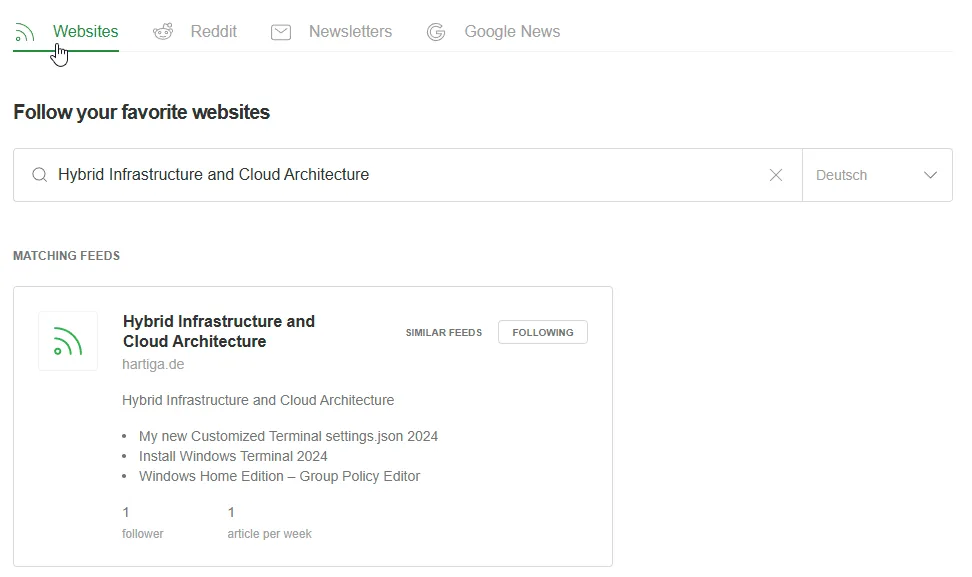
In the search field, enter the URL https://hartiga.de/feed/.

Feedly - Hartiga
Feedly – Hartiga

Then select the feed “Hybrid Infrastructure and Cloud Architecture”.
image
image

Conclusion

RSS Feeds and a good reader are still my favorite way to gather news and follow my topics. This way I can avoid AI based algorithms pointing me to the fancy stuff and stay within my area of interest.

If you want to use your own premise datacenter resources and combine them with newest Cloud technology, take a look at how to learn that by setting up your home lab. There is a German version of this article available here.

Please follow me on LinkedIn, Mastedon for more Microsoft Cloud information, Windows Tools and background around the IT Architect role.


Spread the knowledge
Avatar for Andreas Hartig
Andreas Hartig - MVP - Cloud and Datacenter Management, Microsoft Azure

Related Posts

dragon it system engineer grc benchmark

Windows DNS Performance Testing

DNS issues don’t always show up as clear outages. Often they show up as annoying browser behaviour like “random delays on first page load”, “sometimes it works, sometimes it spins”,…

Spread the knowledge
Read more
IT Security Dragon reading Windows Event Logs

Windows Server Event Log and Event Log Policies

Windows Server Event Log for most teams are only used when something already smells like incident:💥 DC misbehaving,💥 file server “mysteriously slow”,💥 SOC asking for “all the logs you have…

Spread the knowledge
Read more
notepad addons 2025 hero

Notepad++ – Most important AddOns 2025

Notepad++ is my favourite notebook and editor is actually perfect, but it can always be better. For this reason, there are a few “quality of life” improvements that I use…

Spread the knowledge
Read more
Technitium DNS Server on Windows

Homelab – Build a robust DNS foundation – Part 2 using Technitium DNS Server on Windows

Let’s create an improved version of the Technitium DNS server for Windows. Some time ago, I wrote a DNS guide to help you get started with your home laboratory. This…

Spread the knowledge
Read more
Tinyproxy and a dragon IT architect from the shadowrun world looking at a large screen with graphs on it

Tinyproxy on Hyper-V – new Ubuntu 24.04

A Linux VM with Proxy, such as tinyproxy, can be used to reduce bandwidth as it caches frequently requested websites. Today we want to configure a Linux VM with a Proxy and deploy…

Spread the knowledge
Read more
COM Port Management and a dragon IT architect from the shadowrun world looking at a com port and a manufacturing floor

Windows – easy COM Port Management without Admin Rights with Windows 10 & 11

COM Port Management with no administrator rights is a challenge. You might have noticed that I am currently involved in IT and OT discussions. During OT modernization, I encountered a…

Spread the knowledge
Read more