The Active Directory Recycle Bin is not a “nice-to-have” in 2025 — it’s mandatory. It allows fast, attribute-preserving recovery of deleted AD objects without the pain of authoritative restores. It keeps group memberships and critical attributes intact. The only requirement is a forest functional level of Windows Server 2008 R2 or higher. Activation is irreversible, but quick — via ADAC or PowerShell. Do it today.
Table of Contents – Active Directory Recycle Bin
Why Active Directory Recycle Bin Matters Now
In stable, long-lived environments, the biggest enemy is human error: accidental deletions during onboarding/offboarding, clumsy OU reorganizations, or scripts that were too broad in scope. Before Recycle Bin, recovery meant authoritative restores, long downtime, and often the loss of object attributes.
With the Recycle Bin, you can restore objects as they were, including group memberships. This saves time, reduces stress, and lowers operational risk.
Requirements Checklist for Active Directory Recycle Bin
- Forest and domain functional level: Windows Server 2008 R2 or higher.
- Permissions: Enterprise Admins for forest-wide enablement.
- Tools: RSAT/AD PowerShell Module or Active Directory Administrative Center (ADAC).
Enabling the Active Directory Recycle Bin
Option 1: ADAC (GUI)
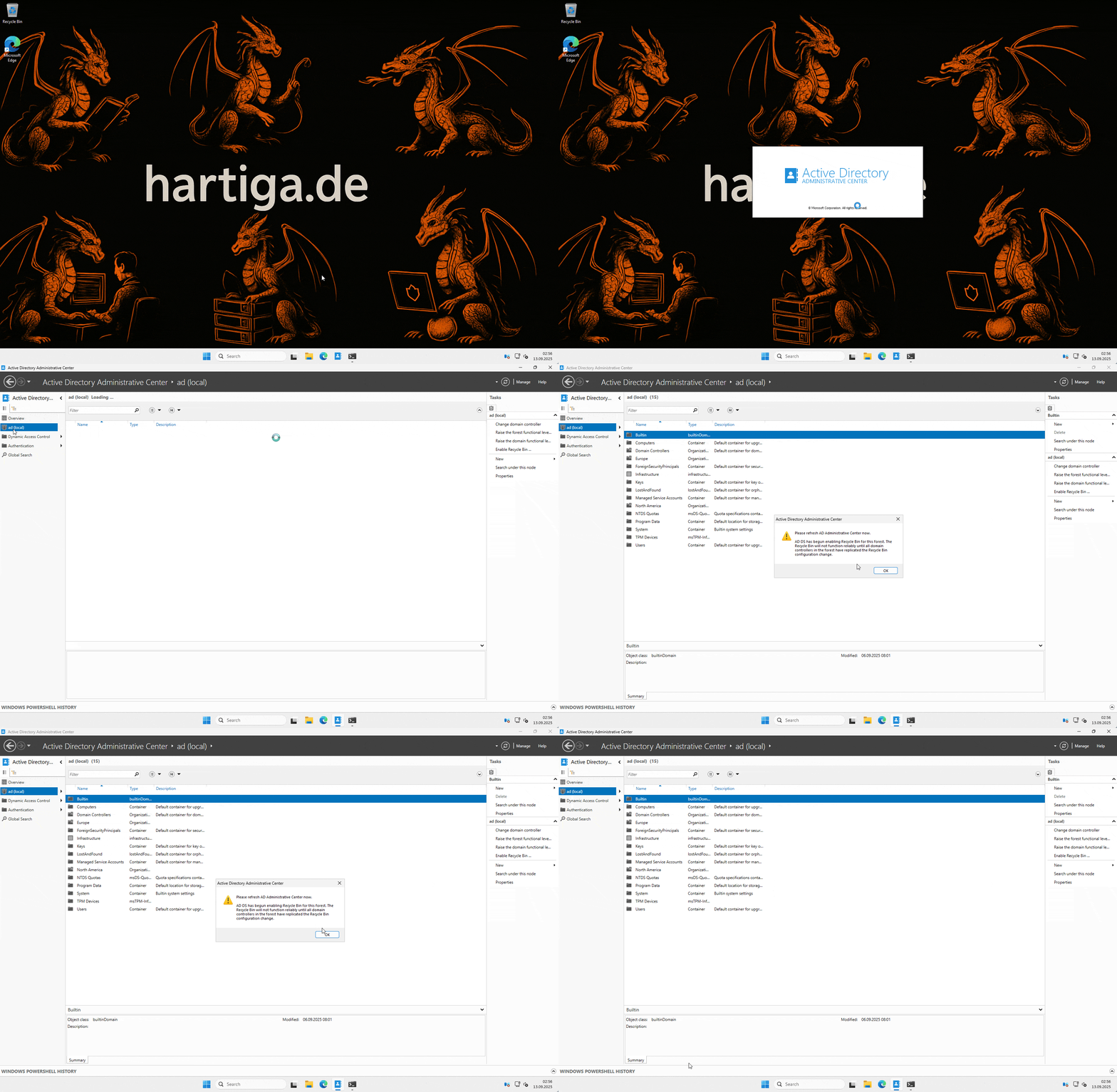
Open ADAC (click run and type in dsac.exe) → Select forest root → Tasks → Enable Recycle Bin → Confirm → Refresh ADAC. Done.
Option 2: PowerShell
# Example for contoso.com
Enable-ADOptionalFeature `
  -Identity 'CN=Recycle Bin Feature,CN=Optional Features,CN=Directory Service,CN=Windows NT,CN=Services,CN=Configuration,DC=contoso,DC=com' `
  -Scope ForestOrConfigurationSet `
  -Target 'contoso.com'
Verify:
Get-ADOptionalFeature -Filter 'Name -like "Recycle Bin Feature"' |
  Format-Table Name, EnabledScopes
Restore Process
Once enabled, you get a Deleted Objects container in ADAC. Objects can be restored with a right-click → Restore or Restore To. Attributes and memberships are preserved. PowerShell can also be used for scripted restores.
Retention & Limitations of Active Directory Recycle Bin
- Lifetime: Controlled by
msDS-deletedObjectLifetime(defaults totombstoneLifetimeif not explicitly set). Check and tune this according to your recovery policy. - No retroactivity: Objects deleted before enabling Recycle Bin cannot be recovered this way.
- Not a backup replacement: For corruption or DC compromise, you still need System State backups and a tested forest recovery plan.
Operational Tips
- Enable Recycle Bin today and test: create → delete → restore a dummy object.
- Plan retention: Set
deletedObjectLifetimewisely (balance between recovery comfort and AD database hygiene). - Document procedures: Provide your helpdesk with a one-page guide for object restore.
- Audit restores: Enable Directory Service Changes auditing for accountability.
- Backups remain essential: This is extra safety, not a replacement for proper DC backups.
Microsoft References for Active Directory Recycle Bin
- Enable AD Recycle Bin (ADAC + PowerShell)
- Enable-ADOptionalFeature Cmdlet Reference
- AskDS / TechCommunity: Deep dive into AD Recycle Bin
- System State Backup Guide
Conclusion
If you take one thing away from this post, let it be this: the Active Directory Recycle Bin is no longer optional.
In 2025, it’s table stakes for any production AD. It doesn’t matter if you run a small forest at home in your homelab or manage a global enterprise — accidental deletions will happen. Without the Active Directory Recycle Bin, you’re stuck with authoritative restores, frustrated users, and late nights. With it, you get a clean, quick recovery that preserves what matters most: attributes and group memberships. Just enable it once, verify it’s active, and sleep better knowing your AD can recover from fat-finger mistakes. Pair it with proper backups, test it in your environment, and make it part of your operational baseline. This is one of those rare wins in IT: low effort, high reward. Do it today. For your homelab build your Active Directory now to get started based on my guide here.
This is not a backup replacement. Keep in mind that “old-school” backups keep you alive. The Recycle Bin makes you fast. Together, they make your AD resilient and easier to administrate.
If you have any questions please don’t hesitate to reach out to me on LinkedIn, Bluesky or check my newly created Adaptive Cloud community on Reddit.
LinkedIn: https://www.linkedin.com/in/andreas-hartig/
Bluesky: https://bsky.app/profile/hartiga.de
Adaptive Cloud community on Reddit: https://www.reddit.com/r/AdaptiveCloud/