Windows LAPS (Local Administrator Password Solution) is the successor to the legacy LAPS, offering significant improvements and new features while maintaining some of the core functionalities of its predecessor. Below is a detailed comparison of the two versions.
Table of Contents
Key Differences Between Legacy and Windows Windows Local Administrator Password Solution
| Feature | Legacy Microsoft LAPS | Windows LAPS |
|---|---|---|
| Integration | Requires separate installation via MSI | Built into Windows 10, 11, and Server platforms (with updates from April 2023 or later) |
| Password Storage Options | Active Directory only | Supports both Active Directory and Azure Active Directory for password storage |
| Password Encryption | Not available | Supports encryption of passwords in Windows Server Active Directory |
| Password History | Not available | Stores password history for auditing or recovery purposes |
| DSRM Account Management | Not supported | Can manage and back up Directory Services Restore Mode (DSRM) passwords on domain controllers |
| Automatic Actions | Limited | Includes automatic responses to password usage (e.g., resetting after retrieval) |
| Migration Support | Not applicable | Offers a legacy emulation mode to ease migration from legacy Microsoft LAPS |
Advantages of microsoft laps vs windows laps
What are the true advantages?
- Native Integration: Built into supported operating systems, eliminating the need for installing additional software on client devices.
- Enhanced Security Features: It introduces password encryption and history tracking, which were absent in the legacy version. These features enhance security and provide better control over password management.
- Cloud Compatibility: Windows LAPS supports Azure Active Directory, enabling organizations to manage local administrator passwords in hybrid or cloud-only environments.
- DSRM Password Management: The ability to manage DSRM passwords adds another layer of functionality for domain controllers.
- Ease of Migration: A legacy emulation mode allows organizations to transition smoothly from legacy Microsoft Local Administrator Password Solution while maintaining compatibility during the migration process.
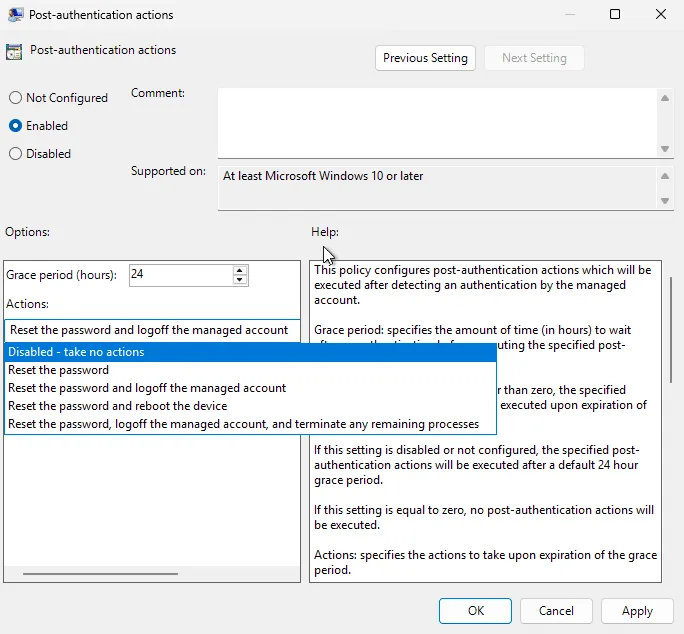
- PostAuthenticationActions: Create Action to limit the time of how long a Windows LAPS password can be used and what the follow up actions are.
For more details check here.
Legacy Microsoft Schema vs new Schema
| Windows LAPS Schema Element | Legacy Microsoft LAPS Schema Element |
| msLAPS-PasswordExpirationTime | ms-Mcs-AdmPwdExpirationTime |
| msLAPS-Password | ms-Mcs-AdmPwd |
| msLAPS-EncryptedPassword | Not available / not used |
| msLAPS-EncryptedPasswordHistory | Not available / not used |
| msLAPS-EncryptedDSRMPassword | Not available / not used |
| msLAPS-EncryptedDRSMPasswordHistory | Not available / not used |
| msLAPS-Encrypted-Password-Attributes | Not available / not used |
Deployment Considerations
While Windows LAPS provides substantial improvements, there are some considerations:
- Legacy Microsoft LAPS is deprecated on newer operating systems, making migration to Windows LAPS necessary for long-term support.
- A side-by-side deployment of both versions is possible for testing purposes but requires careful management as each version can only manage one password per local administrator account.
In conclusion, Windows LAPS represents a modernized and more secure approach to managing local administrator passwords compared to its predecessor. Organizations using legacy Microsoft LAPS are encouraged to migrate to Windows LAPS to benefit from its enhanced features and integration with modern IT environments.
Learn how to deploy Windows LAPS here.