Is your Azure Arc Agent 1.54 stuck and not updating? If that is the case you are in trouble. Azure Arc enabled servers operate on a strict twelve month support window. Once an agent version reaches its one year anniversary, Microsoft considers it unsupported. This is not just a status label; it affects service connectivity and extension reliability.
Table of Contents
Introduction
As of today, April 2026, the following deadlines are critical
- Version 1.52 was released in May 2025 and becomes unsupported in May 2026
- Version 1.54 was released in July 2025 and becomes unsupported in July 2026
Failing to move to the 1.6x branch before these dates will result in degraded connectivity and the inability to manage extensions via the Azure portal.
Technical Deep-Dive Architectural Changes in 1.6x
The transition from version 1.5x to 1.6x introduces the automatic extension upgrade model. This logic moves the responsibility of extension management from external deployment tools directly to the agent.
Important: Versions 1.60 and newer require updated packaging and metadata that traditional WSUS configurations cannot process. If you do not update your synchronization settings, your systems will appear compliant in WSUS while they are actually running unsupported and potentially insecure software. If you rely on WSUS for Azure Arc Agent Updates, please make the necessary configuration as shown below
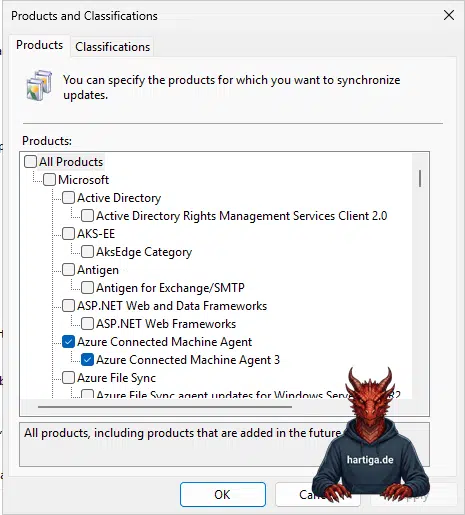
Step-by-step WSUS Configuration for Agent 3
o continue managing updates via WSUS or Configuration Manager, you must enable the specific product category designed for the modern agent branch.
- Open the WSUS Administration Console
- Navigate to Options and select Products and Classifications
- Scroll to the Microsoft Azure section
- Select the check box for Azure Connected Machine Agent 3
- Initiate a manual synchronization to fetch the new metadata
Once this is active, version 1.62 and future releases will appear in your console for approval.
Resolving the Azure Arc Agent 1.54 Stuck
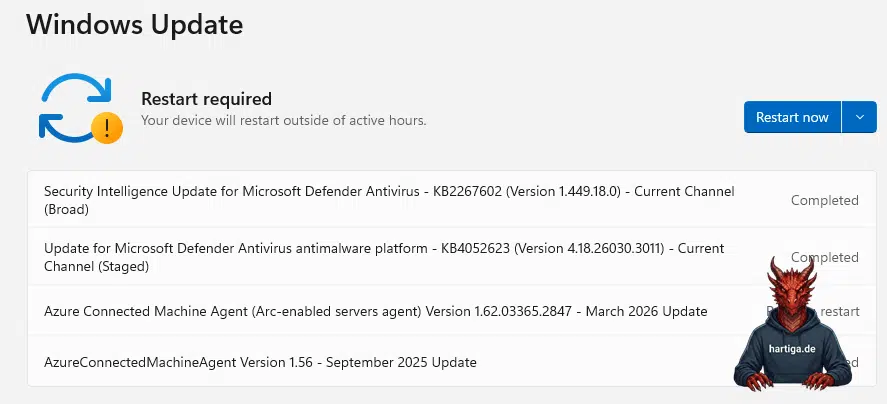
Systems running version 1.54 often experience a deadlock where they refuse to recognize or apply 1.6x updates.
The only reliable way to break this deadlock is a one-time manual intervention. Download the version 1.62 MSI and install it directly on the affected servers. This updates the internal orchestration logic, allowing the system to rejoin the automated update stream. If you encounter that issue, you can also deploy that update using MECM or any other software distribution system.
My recommendations on Azure Arc Agent 1.54 Stuck
Establish version 1.62 as the absolute minimum baseline for all production servers immediately.
Get your patching strategy straight by verifying your WSUS product categories to ensure Agent 3 is syncing correctly or enable the automatic extension upgrade feature in the Azure portal to remove manual maintenance overhead.
Check my blog articles to help with WSUS and Azure Arc Connected Machine Agent patching or use the Azure Update option or use the new preview option for extension upgrades.
Implement a way to monitor agent versions using Azure Resource Graph or Azure Dashboards to identify systems approaching the 12-month limit before they lose support.
Important: Make sure you implement Auto Updating like explained in my arcticle “Enable Azure Arc Auto Updates using WSUS and GPOs” or “Enable Azure Arc Auto Updates using Azure Portal” once you fixed this issue to make it a permanent and operational fix.
Conclusion
The evolution of the Azure Arc agent toward the 1.6x branch reflects the broader move toward cloud-native lifecycle management. Staying within the supported 12-month window is a technical necessity, not a suggestion. By updating your WSUS configuration and manually clearing the 1.54 deadlock, you ensure your hybrid infrastructure remains secure, stable, and ready for future Azure features.
If you have any questions please don’t hesitate to reach out to me on LinkedIn, Bluesky or check my newly created Adaptive Cloud community on Reddit.
LinkedIn: https://www.linkedin.com/in/andreas-hartig/
Bluesky: https://bsky.app/profile/hartiga.de
Adaptive Cloud community on Reddit: https://www.reddit.com/r/AdaptiveCloud/
Additional Resources
What’s new with Azure Connected Machine agent