Local Credential Security – Managing local administrator credentials across an enterprise fleet has always been a fundamental security control. For years, Microsoft Local Administrator Password Solution (often called Legacy LAPS or AdmPwd) served as the standard tool to prevent lateral movement caused by static local admin passwords.
Table of Contents
Introduction to Local Credential Security
Over time, I have explored various facets of local credential security across several standalone articles, including comparing Legacy LAPS and Windows LAPS, analyzing LAPS operational event logging, reviewing essential Windows LAPS management tools and extending password rotation to non-domain workloads using LAPS for Azure Arc.
While those specialized posts dive deep into individual mechanics, the landscape has shifted rapidly. This updated complete guide summarizes and unifies those separate topics into one single reference, bridging traditional Active Directory, cloud-native Entra ID, and hybrid Azure Arc architectures.
In modern threat landscapes, static local admin passwords remain one of the top 5 lateral movement vectors in ransomware incidents.
Who this guide is for: Active Directory administrators, cloud security architects, and hybrid operations teams seeking a unified credential hygiene strategy.
Even in medium-sized environments, field assessments consistently reveal that LAPS is missing, entirely unconfigured or not tracked using event logs. Implementing it is one of the easiest and quickest wins to dramatically raise your security baseline with zero licensing costs. Securing local credentials is step one in stopping lateral movement; step two is closing known vulnerabilities by keeping systems patched, which I covered in detail in my guide on WSUS on Windows Server 2025.
Legacy LAPS vs Windows LAPS Architectural Comparison
Understanding why Windows LAPS replaces Legacy LAPS requires looking at how both implementations function under the hood. For a full breakdown across environments, refer to my detailed comparison article on Legacy LAPS vs Windows LAPS.
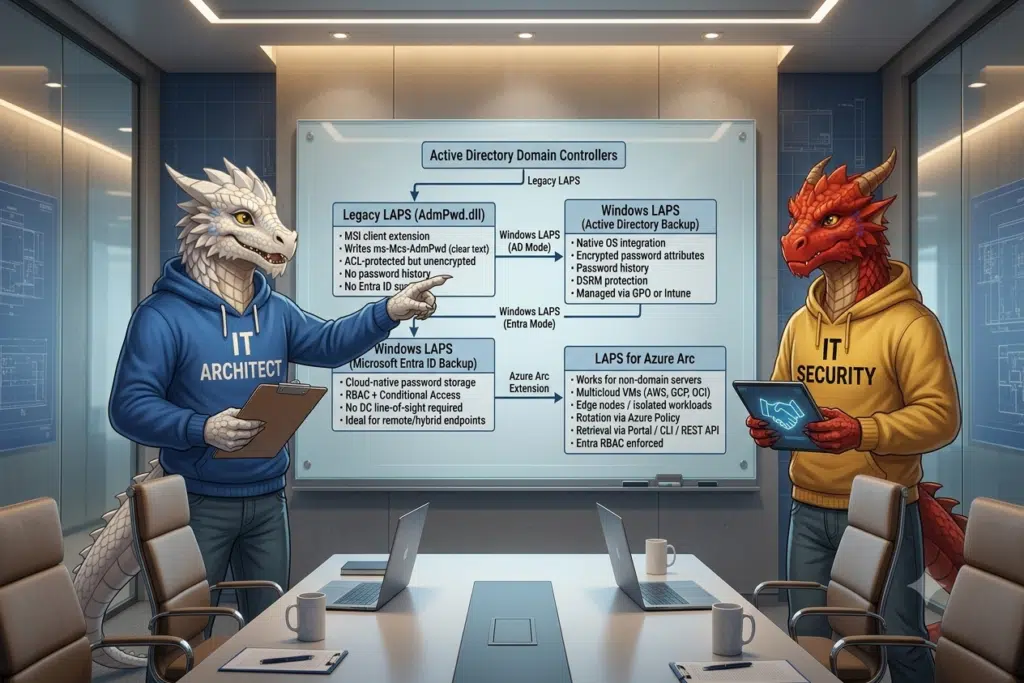
Legacy LAPS relies on an external client side extension installed via an MSI package (AdmPwd.dll). It writes a generated local administrator password into a single Active Directory attribute named ms-Mcs-AdmPwd. While ms-Mcs-AdmPwd is a confidential attribute restricted by Access Control Lists (ACLs), the password stored inside Active Directory is completely unencrypted clear text. Furthermore, Legacy LAPS lacks native support for Azure Active Directory (now Entra ID), password history, or native operating system integration.
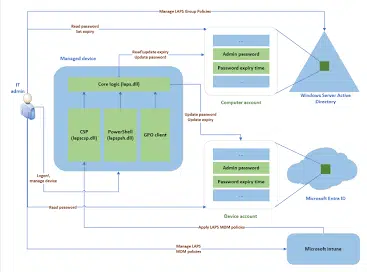
Windows LAPS redesigns the entire workflow. Built natively into Windows 10, Windows 11, and Windows Server 2019, 2022, and 2025, it requires no MSI installation, no custom DLLs, and no external agent maintenance.
Key architectural improvements in Windows LAPS include:
- Native OS integration managed via standard Group Policy or Microsoft Intune
- Password encryption in Active Directory using Directory Services access control and Windows LAPS specific attributes
- Password history storage to allow recovery after a bad rotation or rollback
- Support for backing up credentials directly to Microsoft Entra ID for cloud-native or hybrid devices
- Automatic rotation after password usage and support for Directory Services Restore Mode (DSRM) account protection
Important: Legacy LAPS is no longer supported starting with Windows 11 version 23H2 and newer operating system builds. If you are upgrading client endpoints to recent Windows 11 releases, migrating to Windows LAPS is mandatory to maintain local password rotation.
Tips & Tricks: One lingering limitation in legacy server environments is that Windows Server 2016 does not natively support Windows LAPS. For organizations maintaining Server 2016 instances in OT, healthcare, or legacy operational technology segments, plan your OS upgrade path alongside your credential security architecture.
Expanding LAPS to Azure Arc for Hybrid and Multicloud
A common challenge in modern enterprise architecture is managing servers located outside traditional Active Directory boundaries, such as non-domain-joined VMs, edge nodes, or servers hosted in third-party clouds.
This is where LAPS for Azure Arc bridges the gap (https://hartiga.de/azure/laps-for-azure-arc/). By connecting on-premises or multicloud servers to Azure Arc, you can extend native Windows LAPS capabilities to servers regardless of their domain membership.
Key benefits of LAPS for Azure Arc include:
- Centralized management of local administrator accounts via Azure Policy and Azure Extension management
- Secure password retrieval directly through the Azure Portal, Azure CLI, or Azure REST APIs protected by Entra ID RBAC and Entra Conditional Access
- Elimination of domain controller dependency for server-level local credential rotation
- Unified operational visibility across hybrid server fleets
By unifying Active Directory based Windows LAPS, Entra ID based Windows LAPS, and Azure Arc management, you achieve consistent credential rotation across your entire hybrid cloud footprint.
The LAPS Modernization Maturity Levels
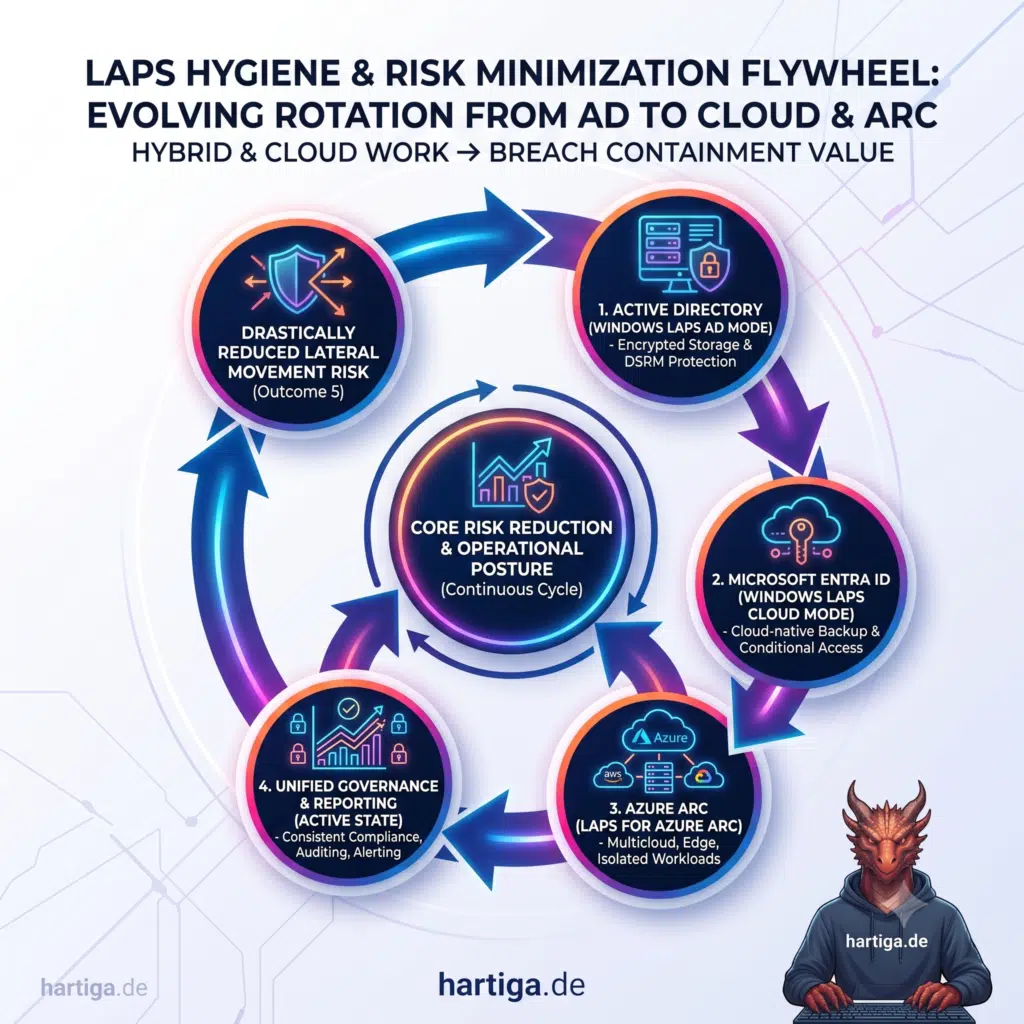
In modern hybrid architectures, identity security controls should not operate in isolated silos. The LAPS modernization journey forms a self-reinforcing flywheel where each phase compounds security gains, eliminates coverage gaps, and reduces operational friction across your infrastructure. Let’s look at the maturity levels.
Stage 1 – Active Directory Foundation (Windows LAPS AD Mode)
The flywheel begins by modernizing the on-premises core. Replacing legacy AdmPwd.dll solutions with native Windows LAPS encrypts password attributes in Active Directory, introduces password history, and protects DSRM accounts without requiring third-party MSI agent maintenance.
Stage 2 – Cloud Endpoint Integration (Windows LAPS Cloud Mode)
Extending policies to Microsoft Entra ID brings cloud-native and hybrid devices into scope. Passwords back up directly to Entra ID, removing domain controller line-of-sight requirements for remote workers while gating retrieval behind Role-Based Access Control (RBAC) and Conditional Access policies.
Stage 3 – Hybrid and Multicloud Extension (LAPS for Azure Arc)
Connecting non-domain servers, edge nodes, and third-party cloud instances (AWS, GCP, OCI) via Azure Arc applies native password rotation across isolated workloads. Governance and retrieval occur seamlessly via Azure Policy, Azure CLI, REST APIs, or the Azure Portal.
Stage 4 – Unified Credential Rotation Across Hybrid Infrastructure
Combining Active Directory, Entra ID, and Azure Arc brings 100 percent of local administrator accounts under automated rotation cycles. Systems engineering and security teams operate through a single governance framework regardless of where the workload resides.
Stage 5 – Improved Operational Security Posture and Continuous Acceleration
Centralized logging and automated rotation free security operations teams from manual credential management. The reduced operational friction feeds back into the loop, enabling tighter rotation intervals, quicker onboarding of new workloads, and continuous security hardening.
Result: Drastic Reduction in Lateral Movement Risk
Static local passwords disappear across client endpoints, domain servers, and multicloud VMs. Attackers lose primary lateral movement vectors, effectively containing the blast radius during credential theft or ransomware incidents.
How I migrate from Legacy LAPS Step-by-step
Migrating from Legacy LAPS to Windows LAPS requires careful planning to avoid losing administrative access during the transition. You can execute this transition using either a direct cutover or a side-by-side coexistence phase.
My step by step planning and implementation approach:
Step 1 – Audit existing Active Directory permissions
Before touching any policies, run a thorough delegation audit to map which security principals currently have read access to the legacy ms-Mcs-AdmPwd attribute. Removing legacy access rights ensures old permissions do not persist into the new structure.
Step 2 – Update Active Directory Schema
Extend your Active Directory schema to support Windows LAPS attributes. Run the Update-LapsADSchema cmdlet from a machine equipped with modern Remote Server Administration Tools (RSAT) using Schema Admin privileges.
Step 3 – Validate / Grant computer account permissions
Execute the Set-LapsADReadPasswordPermission and Set-LapsADResetPasswordPermission cmdlets to grant managed computer objects the authority to write their own encrypted password attributes and expiration timestamps.
Step 4 – Configure Windows LAPS policies
Define your target policy settings in Group Policy or Microsoft Intune. Key settings include specifying the managed administrator account name, password complexity, rotation frequency, and selecting Active Directory or Entra ID as the password backup directory.
Step 5 – Execute cutover or coexistence
For a direct cutover, disable the Legacy LAPS GPO, enable the Windows LAPS GPO, force a policy update on endpoints, verify that the new encrypted attributes are populated, and uninstall the legacy AdmPwd MSI package. For coexistence, configure Windows LAPS to manage a dedicated second local administrator account while legacy LAPS continues managing the original account until full rollout is complete.
Important: Do not attempt to manage the exact same local administrator account simultaneously with both Legacy LAPS and Windows LAPS GPOs, as conflicting rotation schedules can cause local lockout issues.
Community Tools and Audit Insights
Community discussions across identity security and enterprise architecture emphasize that misconfigured Active Directory delegations are one of the most common attack vectors in legacy environments.
My fellow “Cloud and Datacenter Management & Microsoft Azure” Microsoft MVP Mehdi Dakhama developed an open-source tool called LAPS-Delegation-Audit (available on GitHub at https://github.com/dakhama-mehdi/LAPS-Delegation-Audit) specifically to identify ACL flaws and delegated read rights on LAPS attributes prior to migration. Reviewing these ACLs allows blue teams to clean up unexpected broad permissions that may have accumulated over years of operational changes.
My recommendations
If you only do three things, do these:
- Enable Windows LAPS across all endpoints today using default settings; it requires zero license cost and instantly cuts lateral movement risk.
- Audit and clean up legacy Active Directory attribute read delegations using community tooling before executing schema changes.
- Pair credential rotation with automated patching via WSUS (https://hartiga.de/windows-server/wsus-on-windows-server-2025/) to eliminate the two primary attack vectors in modern networks.
My Operational best practices
Prioritize Active Directory ACL cleanup before enabling Windows LAPS schema attributes. Simply enabling new policies without revoking legacy delegations leaves residual attack paths open.
Transition cloud-connected endpoints entirely to Entra ID backed LAPS via Microsoft Intune to eliminate Kerberos dependencies and domain controller line-of-sight requirements for remote workers.
Leverage Azure Arc for non-domain servers to create a standardized credential management framework across on-premises datacenters and multicloud environments.
Implement automated event log monitoring using Windows LAPS event IDs (located in Application and Services Logs – Microsoft – Windows – LAPS – Operational) to alert security operations teams immediately if password decryption fails or manual overrides occur (https://hartiga.de/windows-server/laps-events/).
Conclusion
Legacy LAPS laid important ground rules for local credential hygiene, but it is fundamentally a tool of the past. Windows LAPS and LAPS for Azure Arc deliver the encryption, OS integration, password history, and hybrid cloud capability required for modern IT architectures.
Upgrading from Legacy LAPS is straightforward, low risk when audited properly, and removes one of the most significant lateral movement risks from your environment.
If you have any questions please don’t hesitate to reach out to me on LinkedIn, Bluesky or check my newly created Adaptive Cloud community on Reddit.
LinkedIn: https://www.linkedin.com/in/andreas-hartig/
Bluesky: https://bsky.app/profile/hartiga.de
Adaptive Cloud community on Reddit: https://www.reddit.com/r/AdaptiveCloud/
My YouTube Channel: https://www.youtube.com/@hartiga