Windows Home Edition – Group Policy Editor

If you are using a Windows Home version and want to make a setting via Group Policy, you will find that there is no Group Policy Manager under Windows Home versions.

Solution PolicyPlus

There is a solution for this on Github called “PolicyPlus“. If you download the Group Policy extension from the website via this direct link, you can easily bypass this limitation.

This looks quite similar and you can do less in the registry and more controlled in a graphical user interface.
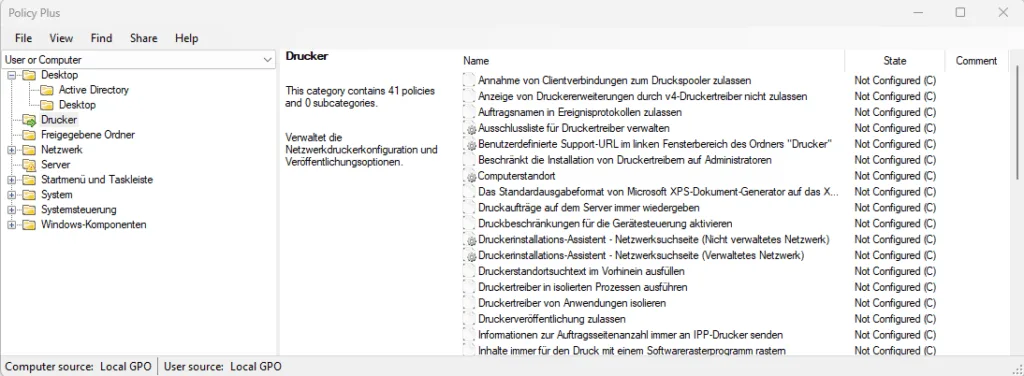
Windows 11 Policy Plus Beispiel 1024x376 1
Windows 11 Policy Plus Example

Policy Plus features

Policy Plus should make the group policy settings accessible to everyone.

  • runs and works on all Windows editions, not just Pro and Enterprise
  • Full compliance with licensing (i.e. does not transplant components across Windows installations)
  • View and edit registry-based policies in on-premises GPOs, user-specific GPOs, individual POL files, offline registry user hives and live registry
  • Navigate to policies by ID, text or affected registry entries
  • Display additional technical information about objects (policies, categories, products)
  • Convenient options for sharing and importing policy settings

Enable more features for the Windows Home Edition

Some administrative templates are available by default in the Home versions, but many are missing. The latest complete package can be downloaded from Microsoft

Administrative Templates (.admx) for Windows 11 2022 Update (22H2) - v2.0
Administrative Templates (.admx) for Windows 11 2022 Update (22H2) – v2.0

and installed via Help | Acquire ADMX files.

Windows 11 Group Policy Plus Hilfe
Windows 11 Group Policy Plus Help

Important Information – Logoff / Logon

The native RefreshPolicyEx feature has limited functionality in editions without a full Group Policy infrastructure. Although Policy Plus can edit the local GPO and apply the changes to the registry, a restart or logon/logoff cycle is required for some policy changes to take effect.

Find more cool tools here.

Spread the knowledge
Avatar for Andreas Hartig
Andreas Hartig - MVP - Cloud and Datacenter Management, Microsoft Azure

Related Posts

IT Operations Drache looking at Event Logs

Modern Windows Event Viewer – EventLogExpert

The project Windows Event Viewer – EventLogExpert provides a modern open-source toolset that fundamentally improves the way we interact with Windows Event Logs. Since troubleshooting .evtx files is often a…

Spread the knowledge
Read more
IT Developer Dragon red with bronze skin

Windows Terminal and Oh My Posh – personalization for improved coding

Windows Terminal and Oh My Posh are a great combination! In the past we looked here at how to utilize the Windows Terminal in a personalized way to improve usability…

Spread the knowledge
Read more
Winget and IaC SystemEngineerDragon

WinGet and IaC – Take Winget to the next level

WinGet and IaC are maybe your next step to automate your environment. In the past, managing third-party applications on Windows meant 3rd party tools or gathering MSI installers on network…

Spread the knowledge
Read more
Dragon IT Operations logfile tailing using Klogg

Tail for log files with Windows – 2026 Edition

I view a lot of log files—probably more than I’d like to admit. Whether it’s troubleshooting a hybrid infrastructure issue or debugging a cloud deployment, I always look for the…

Spread the knowledge
Read more
dragon it system engineer grc benchmark

Windows DNS Performance Testing

DNS issues don’t always show up as clear outages. Often they show up as annoying browser behaviour like “random delays on first page load”, “sometimes it works, sometimes it spins”,…

Spread the knowledge
Read more
IT Security Dragon reading Windows Event Logs

Windows Server Event Log and Event Log Policies

Windows Server Event Log for most teams are only used when something already smells like incident:💥 DC misbehaving,💥 file server “mysteriously slow”,💥 SOC asking for “all the logs you have…

Spread the knowledge
Read more