Protect object from accidential deletion is your 1st line of protection, if you value your OU structure. The checkbox “Protect object from accidental deletion” stops both accidental deletes and moves. Without it, one wrong click in ADUC or a faulty script can wipe out your OU hierarchy. Enforce it across the board — ideally automated with PowerShell.
Table of Contents
Technical Background around Protect object from accidental deletion
The setting adds Deny Access Control Entries for “Delete” and “Delete Subtree” (usually against Everyone). This prevents both direct deletes and moves (since moves internally perform a delete on the source container). It’s simple, robust, and has been available for years.
Why Protect object from accidental deletion Matters
- Stops the accident chain: One misplaced click can collapse half your AD structure.
- Raises change discipline: You must consciously disable protection before deleting or moving an OU.
- Supports safe delegation: You can delegate admin tasks without leaving the OU tree vulnerable.
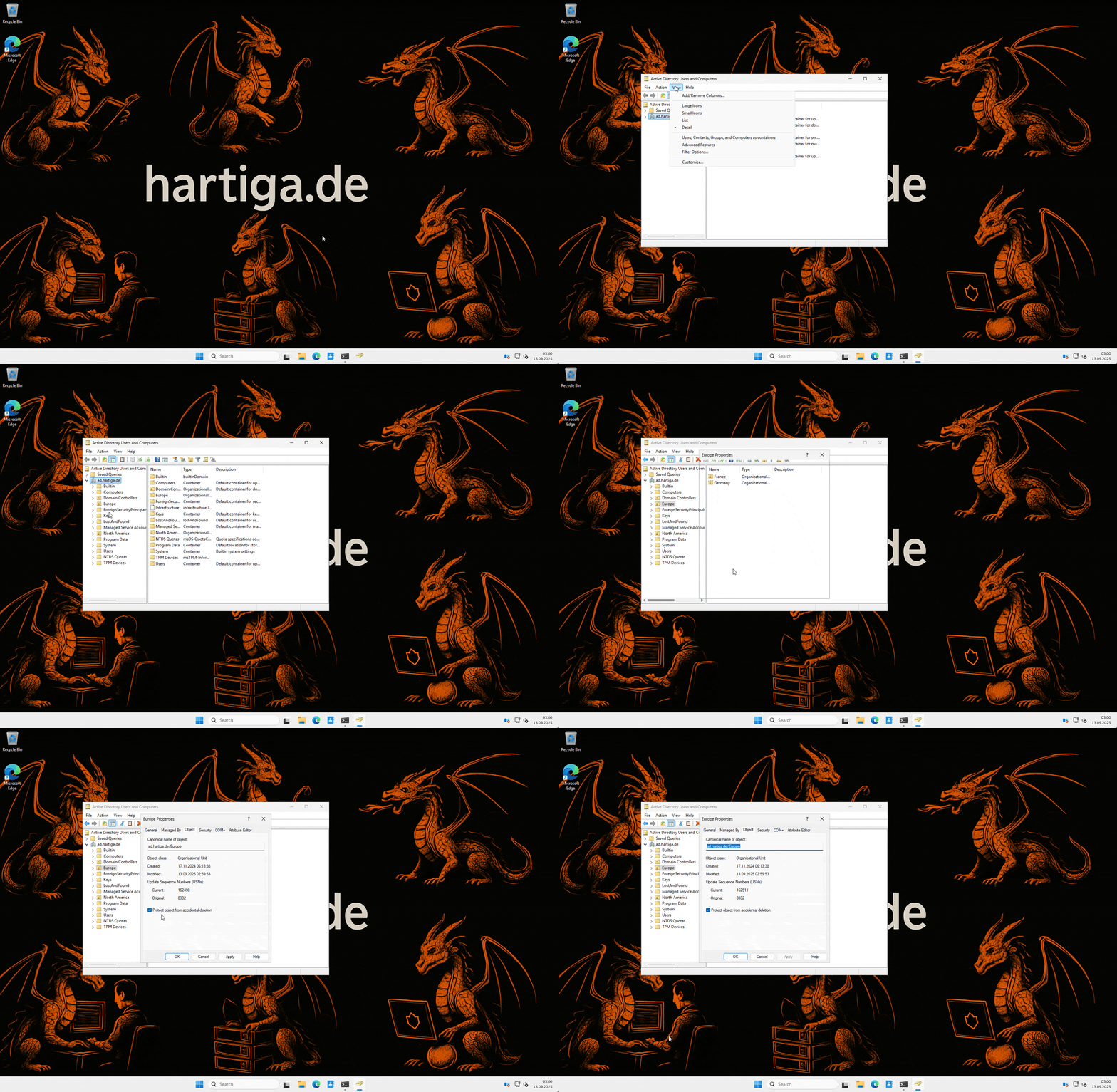
Enabling Protection using the GUI
GUI (ADUC):
OU → Right-click → Properties → Object tab → Protect object from accidental deletion. Done. (To delete/move later, untick temporarily.)
Protect all OUs in a domain
Lets quicky look at Powershell options to enable “Protect object from accidental deletion”
PowerShell (at scale):
# Protect all OUs in a domain
Get-ADOrganizationalUnit -Filter * |
  Set-ADObject -ProtectedFromAccidentalDeletion $true
Create new OU with protection:
New-ADOrganizationalUnit -Name "Workstations" -Path "DC=contoso,DC=com" `
  -ProtectedFromAccidentalDeletion $true
Selective example:
Get-ADOrganizationalUnit -LDAPFilter '(name=*_PRD)' |
  Set-ADObject -ProtectedFromAccidentalDeletion $true
When You Do Need to Delete/Move
Disable the flag first, run the action, then re-enable it. For powershell use this command:
Set-ADObject -Identity "OU=Workstations,DC=contoso,DC=com" `
  -ProtectedFromAccidentalDeletion $false
Afterwards, reset it back to $true. Otherwise you’ll get Access denied — by design.
Delegation Scenarios
You can allow delegated groups to toggle this setting without granting full control. Build it into your RBAC model, document exceptions, and make it part of your operational standards.
Operational Recipes
Monthly baseline script: Re-applies protection on all OUs except a defined allowlist.
Provisioning scripts: Always include -ProtectedFromAccidentalDeletion $true when creating OUs.
Change windows: Require project teams to log where/when they disable the flag.
GPOs too: GPOs can be protected in GPMC the same way.
Audit events: Enable Directory Service Changes auditing for visibility.
Important – combine it with Recycle Bin & Backups
Protection stops mistakes before they happen.
- Recycle Bin recovers objects after mistakes.
- System State backups are your ultimate fallback.
Together, they form a layered defense. Check this guide on how to enable the recycle bin.
Troubleshooting for Protect object from accidential deletion
- “Can’t delete an OU I need to remove”: Untick protection → delete → retick afterwards.
- “Move operation fails”: Same reason — moving triggers delete on source.
- Replication: ACE changes replicate like any other AD change; allow time across multi-DC setups.
Microsoft References for Protect object from accidential deletion
Bottom line: The checkbox may look old-fashioned, but it works. Combine it with Recycle Bin and auditing, and your AD becomes resilient, recoverable, and far easier to manage.
Conclusion around Protect object from accidential deletion
If Recycle Bin is your safety net after a fall, “Protect object from accidental deletion” is the guardrail that keeps you from falling in the first place.
It’s one of those small, almost boring settings that ends up saving you countless hours of cleanup. Accidental deletes and clumsy OU moves don’t just break your AD — they disrupt onboarding, GPO links, and sometimes entire service chains.
By enabling this flag everywhere (and baking it into your automation and operational procedures), you shift from reactive recovery to proactive prevention. Delegation becomes safer, change discipline improves, and your OU hierarchy stops living on borrowed time. Pair this with Recycle Bin and proper backups, and you’ve built a layered defense that’s both simple and powerful. Low cost, high return, no excuses — check the box, run the script, and make it part of your baseline today.
If you have any questions please don’t hesitate to reach out to me on LinkedIn, Bluesky or check my newly created Adaptive Cloud community on Reddit.
LinkedIn: https://www.linkedin.com/in/andreas-hartig/
Bluesky: https://bsky.app/profile/hartiga.de
Adaptive Cloud community on Reddit: https://www.reddit.com/r/AdaptiveCloud/