Let’s be honest. Anyone who promoted a Domain Controller on Windows Server vNext Build 29602 back in June already had a pretty strong suspicion about what the next release would be called. Seeing Windows2028Forest and Windows2028Domain show up in Active Directory was not exactly subtle.
At Microsoft Ignite 2026, Microsoft finally made it official. The “vNext” working title is gone, and Windows Server 2028 is now in Public Preview starting with Windows Server Insider Preview Build 29706 (released November 17, 2026). Along with the preview bits, Microsoft published the updated What’s new in Windows Server 2028 Preview hub and a very clear Features removed or no longer developed in Windows Server documentation page on Microsoft Learn.
I am currently on the road without access to my homelab, which actually gives me a good reason to step away from PowerShell for a week and look at the bigger architectural picture. Hands-on testing beats guessing every single time, so Build 29706 is going straight onto my HP EliteBook 840 G6 bare-metal lab the moment I get home. Until then, here are my main takeaways from Ignite 2026, what is actually available to test in Build 29706 versus what sits on the 2028 roadmap, what you need to audit from the removal list today and how things evolved since Windows Server Summit 2026 in May
Table of Contents
8 Architectural Shifts in Windows Server 2028
For me, Windows Server 2028 is clearly not just another routine LTSC refresh. Across the official Windows Server 2028 Preview documentation, the Microsoft Ignite 2026 Windows blog, and breakout session BRK418, Microsoft is changing three long-standing assumptions at the same time: new Server Core installations ship hardened out of the box, legacy backward compatibility is no longer sacred, and on-premises datacenters are being positioned for hybrid AI inference alongside classic infrastructure workloads.
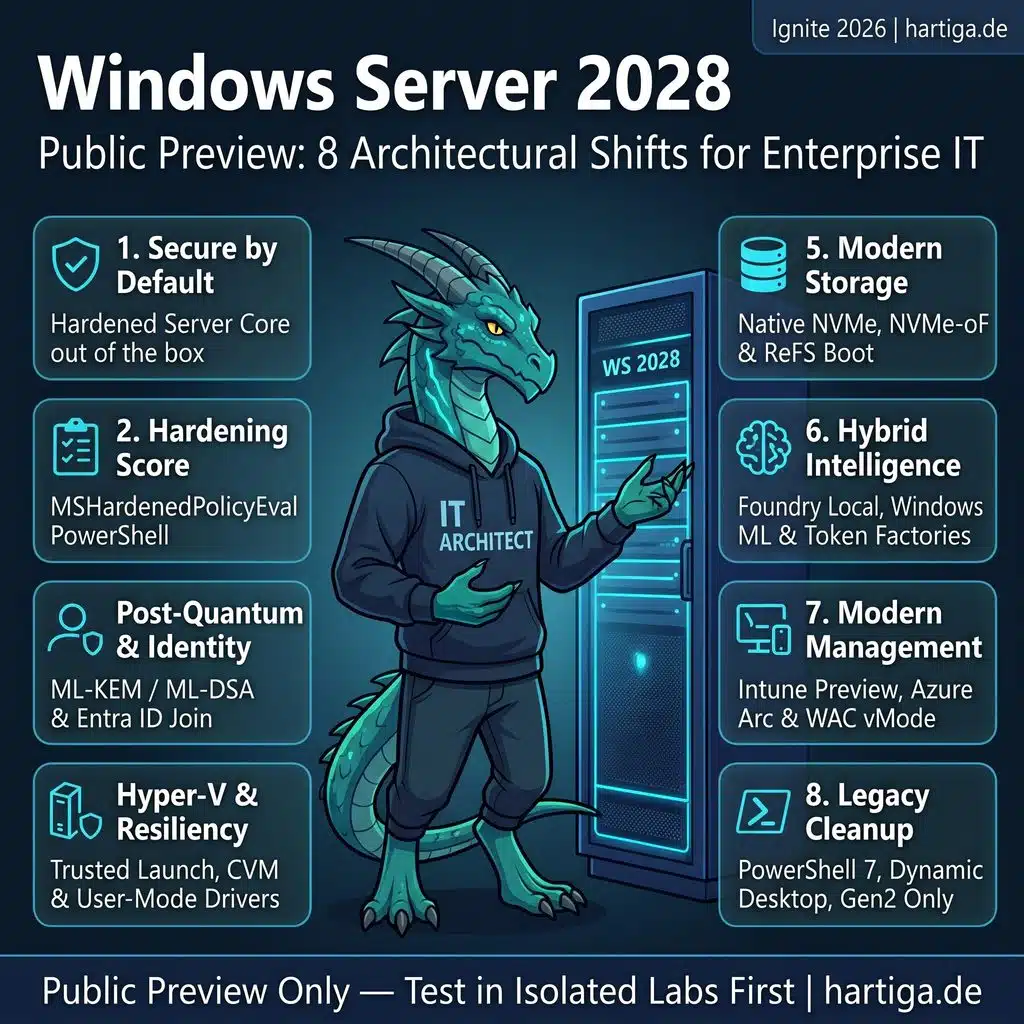
Here are the eight areas I am tracking most closely:
- Security by Default (Hardened Server Core): For more than two decades, Windows Server shipped open for application compatibility and left hardening to us via GPOs and Security Compliance Toolkit baselines. Starting with Server Core in Build 29706, hundreds of security settings are enabled from day one, including stronger LSASS protection, Kerberos prioritization over NTLM, mandatory SMB signing and encryption, and stricter auditing.
- Built-in Hardening Assessment (
MSHardenedPolicyEval): Alongside Hardened Server Core, Microsoft ships theMSHardenedPolicyEvalPowerShell module right in the OS. Instead of guessing which baseline setting broke an older line-of-business app, you can score your host, relax a single category, and re-apply it cleanly. - Post-Quantum Cryptography and Entra ID Identity: Post-quantum cryptographic readiness builds on the NIST ML-DSA certificate support we already spotted in AD CS in Build 29602. On the identity side, Windows Server 2028 Preview adds native Microsoft Entra ID join without requiring Active Directory Domain Services.
- Hyper-V Security and OS Resiliency: Trusted Launch for Generation 2 VMs (first previewed in Build 29641) is joined by Confidential VM (CVM) support starting with stateless VMs and Azure attestation, plus a major resiliency shift moving network drivers from kernel mode into user mode.
- Modern Storage Stack: Native NVMe moves to enabled by default (no more manual registry keys like on Windows Server 2025), paired with the kernel-level NVMe-over-Fabrics (TCP and RDMA) initiator and ReFS Boot parity work with NTFS. If you want the deep dive on ReFS Boot, check my existing guide Windows Server vNext: ReFS Boot explained.
- Hybrid Intelligence (“Token Factories”): Microsoft Foundry, Foundry Local, Windows ML, vLLM, and Llama.cpp bring local AI inference closer to enterprise data, governed by Agent 365 and isolated with Microsoft eXecution Containers (MXC).
- Modern Management with Intune and WAC vMode: For years, my standard answer to managing Windows Server with Intune was simple: use Azure Arc instead. Now Microsoft is opening Intune and Windows Autopatch for eligible Windows Server environments in preview, sitting alongside Azure Arc and the newly GA Windows Admin Center Virtualization Mode (vMode).
- Inbox Admin Tooling and Legacy Cleanup: PowerShell 7, Sysmon, and WinGet on Server Core ship inbox, Dynamic Desktop is announced to return, and legacy roles like WSUS, SMBv1, WINS, VBScript, PC/AT Legacy BIOS, and default WOW64 are being removed.
What Landed in Build 29706 vs. the Windows Server 2028 Roadmap
Before diving into PowerShell commands, it helps to separate what you can actually test in Build 29706 today (documented on Microsoft Learn) from the broader roadmap items Microsoft previewed in session BRK418 for the Windows Server 2028 wave:
| Available to Test Now (Build 29706 & Current Previews) | Previewed for the Windows Server 2028 (BRK418 ) |
Secure by default for Server Core (Hardened Server Core & MSHardenedPolicyEval) | Dynamic Desktop (add/remove Desktop GUI on Server Core) |
| Native Microsoft Entra ID Join (via Settings, no AD DS required) | User-mode networking drivers (Windows Resiliency Initiative) |
| Microsoft Intune management for Windows Server (Opt-in Preview) | Software Defined Networking (SDN) integrated as an OS service |
| SMB Policy Controller (workload intent & drift reconciliation) | Client-style OS upgrade rollback (“go back”) |
| PowerShell 7 inbox (side-by-side with Windows PowerShell 5.1) | Agent 365 governance, MXC isolation & Token Factory fabric (TAP / Early Access) |
| Trusted Launch for Generation 2 VMs (Preview) | Confidential VMs on Hyper-V (starting with stateless VMs & Azure attestation) |
| Quick Machine Recovery (QMR) | Native-API Cluster-Aware Updating (CAU) & PowerShell GenScript resource |
| NVMe over Fabrics (NVMe-oF) initiator & ReFS Boot | WOW64 moving to Feature on Demand & SMB MFA |
If you only bookmark critical official links, make it What’s new in Windows Server 2028 Preview. Together with Microsoft’s Hardened Server Core announcement, these are the concrete Build 29706 additions I want to test first when I get back to my lab:
Hardened Server Core and MSHardenedPolicyEval: You can inspect your current compliance score, preview what relaxing a category would change, and restore the Microsoft hardened baseline directly from an elevated PowerShell session:
# Evaluate overall and per-category hardening score on Build 29706+
Get-MSHardenedPolicyScore | Format-Table Name, PassingPolicyCount, PolicyCount, Score -AutoSize

# Preview changes before relaxing a category (for example, RemoteManagement)
Restore-MSHardenedPolicy -Category RemoteManagement -WhatIf

# Relax only the category causing an app compatibility issue
Restore-MSHardenedPolicy -Category RemoteManagement

# Re-apply the hardened baseline once the workload is remediated
Set-MSHardenedPolicy -Category RemoteManagement
Important: Restore-MSHardenedPolicy resets that category to traditional Windows Server defaults. It is not a rollback snapshot of custom local edits, so test your backup agents, monitoring tools, and legacy apps in an isolated lab first.
Entra ID Join and Microsoft Intune Preview: Servers on Insider builds can join Microsoft Entra ID directly without Active Directory Domain Services and enroll in Microsoft Intune (non-production preview) for configuration, updates, compliance, and Win32 app deployment. For smaller environments that are already 95% Entra and Intune on endpoints, this opens up real choice. For larger hybrid datacenters, Azure Arc remains the primary cloud operations control plane.
SMB Policy Controller and SMB MFA: Documented on Microsoft Learn for Build 29706, the new SMB Policy Controller replaces manual share-by-share tuning with PowerShell-driven workload intent (such as departmental file storage or application data) and security- or performance-focused profiles. It manages share-specific and server-wide settings separately and automatically reconciles configuration drift over time. In BRK418, Microsoft also highlighted upcoming MFA capabilities for SMB alongside the complete removal of SMBv1.
PowerShell 7 Side-by-Side and QMR Policies: PowerShell 7 ships natively alongside Windows PowerShell 5.1 so existing automation keeps running while you migrate scripts. Quick Machine Recovery (QMR) also gains Group Policy controls on Microsoft Learn so enterprise teams can govern cloud-assisted WinRE remediation properly.
What Is Deprecated or Removed in Windows Server 2028
Microsoft updated the official Features removed or no longer developed in Windows Server documentation on November 17, 2026. For me, this is the most actionable part of the entire Ignite announcement because several of these components are still running quietly in production datacenters today.
(Note from Microsoft Learn: features listed under Windows Server 2028 removal plans may still be present in early preview builds, and removal timelines can still adjust before General Availability.)
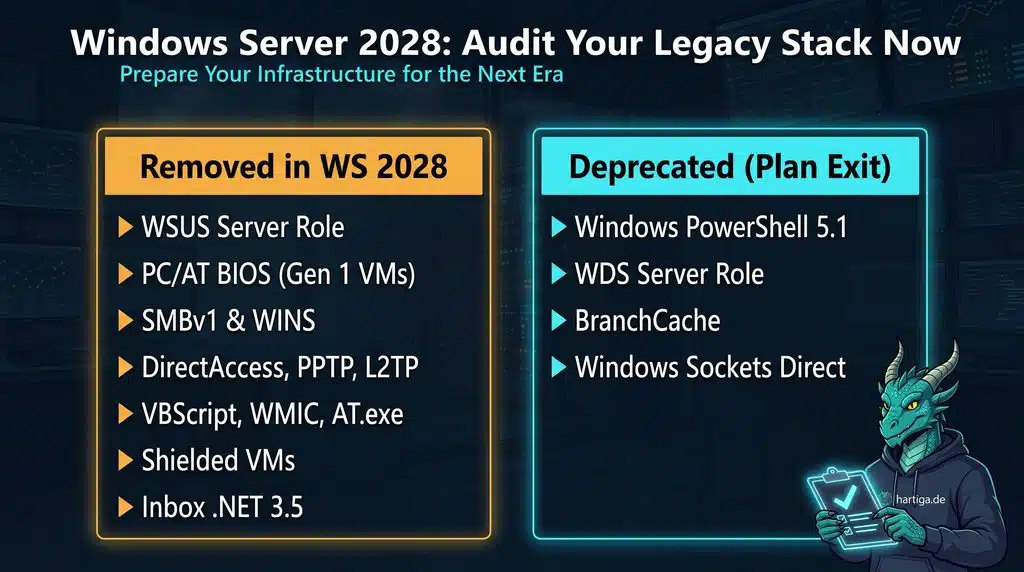
Removed in Windows Server 2028:
- Windows Server Update Services (WSUS) server role: Removed completely as a server role in Windows Server 2028. Existing WSUS deployments on Windows Server 2025 and earlier remain supported through their normal lifecycles, while Microsoft directs modern patching toward Azure Update Manager, Windows Autopatch, and Intune.
- PC/AT Legacy BIOS support: According to the current Microsoft Learn preview documentation, PC/AT and legacy BIOS boot are removed in Windows Server 2028, UEFI is required, and Windows Server 2028 guest VMs require Generation 2 Hyper-V VMs (Generation 1 VMs running earlier guest operating systems remain supported on the host). Microsoft strongly recommends standardizing on Generation 2 VMs moving forward.
- Legacy networking and file protocols: SMBv1, the WINS server role, DirectAccess, and PPTP/L2TP remote access.
- Legacy scripting, scheduling, and runtimes: VBScript, WMIC (WMI itself stays; migrate scripts to PowerShell), AT Time Service (
at.exe, replaced byschtasks), MultiPoint Services, and the inbox .NET Framework 3.5 optional Windows component (available via standalone installer instead). - Shielded VMs: Replaced by Trusted Launch VMs. Keep in mind that Microsoft Learn notes the Trusted Launch VM preview does not yet support failover clusters or Hyper-V Replica, and VM key portability is limited.
Deprecated in Windows Server 2028 (still available for now, plan your exit):
- Windows PowerShell 5.1: Deprecated alongside inbox PowerShell 7, so start validating your operational scripts and modules on PowerShell 7 now.
- Windows Deployment Services (WDS) server role: Deprecated, including WDS-assisted PXE.
- BranchCache and Windows Sockets Direct: Both are deprecated starting with Windows Server 2028.
Important: Inventory the use of WSUS, Generation 1 VMs, VBScript, WMIC, PowerShell 5.1 dependencies, and .NET Framework 3.5 in your current environment now. Discovering a hidden blocker during an upgrade window is never fun.
From Windows Server Summit 2026 to Ignite 2026: What Actually Changed
Back in May 2026, I broke down all 19 sessions of the Windows Server Summit across three articles on this blog. Looking back at those notes six months later, Ignite 2026 did not change the architectural direction Microsoft laid out in May. Instead, it turned several key previews into General Availability releases and put hard removal notices on legacy roles.

Here is what we learned during the Summit and what critically changed by Ignite 2026:
- From Windows Server Summit 2026 – Day 1 (Control Plane, Baselines, and Platform Hardening): Day 1 visualized Microsoft’s “Operational Control” stack (AD, GPO, System Center, and MMC transitioning toward Entra ID, Azure Arc, and Windows Admin Center), alongside OSConfig security baselines, LAPS for Azure Arc, AD CS post-quantum readiness, and early Windows Admin Center Virtualization Mode (vMode) in preview. What critically changed at Ignite 2026: The modern control stack expanded sharply. Microsoft Intune (Preview) and native Microsoft Entra ID join entered Windows Server 2028 Preview (Build 29706), Hardened Server Core made security baselines the day-one default, WAC vMode graduated to GA, and the legacy column of that May slide took direct hits with WSUS removed and Windows PowerShell 5.1 deprecated.
- From Windows Server Summit 2026 – Day 2 (Azure Arc, WAC vMode, Feature Updates, and Local AI): Day 2 gave us our first tour of WAC vMode, Azure Arc auto-updates and multi-cloud management, media-based N-4 upgrades, registry-enabled Windows Update feature upgrades, an early look at the vNext rollback mechanism, and the first preview of AI workloads on Windows Server. What critically changed at Ignite 2026: WAC vMode reached General Availability on November 16, 2026 in Windows Admin Center 2611 (unified installer with Admin Mode, scaling up to 1,000 Hyper-V hosts and 25,000 VMs, native Azure Arc onboarding, built-in backup/restore, and AD CS certificate management). Azure Arc Hotpatching became free for Windows Server 2025, Microsoft previewed a client-style “go back” OS upgrade rollback capability in BRK418 and discussed rollback windows measured in roughly weeks rather than days, and local AI expanded into Windows Server 2028’s fifth datacenter pillar backed by MXC, Agent 365, and dedicated accelerator hardware.
- From Windows Server Summit 2026 – Day 3 (Core Storage, Identity, PKI, Clustering, and AVD): Day 3 focused on the foundational pillars of enterprise infrastructure: Active Directory modernization, future-proofing AD CS PKI, NVMe and ReFS storage, failover clustering, and Azure Virtual Desktop for Windows Server admins. What critically changed at Ignite 2026: Almost every Day 3 thread hit a major milestone. Native NVMe is now enabled by default in Windows Server 2028 alongside the NVMe-oF initiator and ReFS boot parity work, base AVD Hybrid on Windows Server reached GA on September 1, 2026, and Cluster-Aware Updating (CAU) is being rebuilt directly into the cluster service using native APIs with a PowerShell GenScript resource replacing VBScript.
For me, comparing my May 2026 Summit notes with the updated Ignite 2026 control stack makes one thing obvious: the “Evolving Control Stack” is no longer a keynote concept. With WAC vMode GA, free Arc Hotpatching on Windows Server 2025, and WSUS leaving Windows Server 2028, the transition window is open right now.
Must-Watch Session: What’s New and What’s Next for Windows Server (BRK418)
If you have 47 minutes while traveling or over lunch this week, watch the official Ignite 2026 breakout session What’s new and what’s next for Windows Server | BRK418. Several of the capabilities below are forward-looking roadmap items announced for the Windows Server 2028 wave rather than shipping in Build 29706 today, so I have included exact timestamps so you can jump straight to Microsoft’s engineering slides and demos:
Expanding from Four to Five Datacenter Pillars: After confirming the Windows Server 2028 name, Neil outlines how Windows Server is expanding beyond its traditional four pillars (compute, storage, networking, and databases) to add a fifth pillar: local AI inference token factories inside corporate datacenters and branch offices.
AI Governance and New Accelerator Hardware: Microsoft positions Agent 365 for agent identity and Microsoft eXecution Containers (MXC) for strict workload isolation, including air-gapped environments. On the hardware side, Microsoft announced Windows Server 2028 GA support for the NVIDIA DGX Station for Windows Server featuring the Grace Blackwell GB300 platform and 748 GB of coherent memory (also confirmed on the Windows Experience Blog), alongside the AMD Instinct MI350P PCIe accelerator (144 GB HBM3, targeting preview in H1 2027 for both Windows Server 2025 and 2028).
Why Microsoft Is Raising the Hardening Bar and Cutting Legacy Roles: Elden explains that AI-assisted vulnerability discovery drove the largest volume of MSRC security fixes in Windows history in the October update. Older legacy components built on outdated protocols cannot realistically be secured without full rewrites, driving both Hardened Server Core by default and aggressive legacy removals.
Prepare for Gen 2 VMs Only: With PC/AT Legacy BIOS slated for removal on Microsoft Learn, Elden advises admins to stop deploying new Windows Servers as Generation 1 VMs today and standardize on Generation 2 (UEFI) to preserve future in-place upgrade paths to Windows Server 2028.
Storage, User-Mode Networking, SDN, and Upgrade Rollbacks: Native NVMe moves to enabled by default for better IOPS, lower latency, and reduced CPU overhead, joined by the inbox NVMe-oF initiator and ReFS boot parity work. On the resiliency side, Microsoft plans to move networking drivers from kernel mode into user mode so faulty third-party updates cannot take down hosts. Elden also previewed two upcoming platform shifts: integrating Software Defined Networking (SDN) directly into the OS as a service instead of a separate appliance VM, and bringing a client-style “go back” upgrade rollback capability to Windows Server, discussing rollback windows measured in roughly weeks rather than days.
Failover Clustering, Inbox Tooling, and Dynamic Desktop Returning: Cluster-Aware Updating (CAU) is moving directly into the cluster service using native APIs rather than WMI calls, and a PowerShell GenScript resource replaces VBScript. Windows Admin Center Virtualization Mode (vMode) is GA, while PowerShell 7, Sysmon, and WinGet on Server Core ship inbox. Looking ahead in the 2028 cycle, Elden also announced the return of Dynamic Desktop, allowing admins to temporarily add the Desktop GUI to Server Core during an outage to use Explorer and Event Viewer and then remove it again to keep the production footprint small, alongside moving WOW64 to a Feature on Demand to block 32-bit malware by default.
Windows Server 2025 Updates and WS 2016 ESU Warning: Azure Arc Hotpatching is now free for Windows Server 2025, AVD Hybrid on Windows Server reached GA on September 1, 2026, and Elden closed with a clear warning ahead of Windows Server 2016 End of Support (January 2027): do not treat Extended Security Updates as a long-term comfort zone, because modern platform hardening and post-quantum cryptography enhancements are not all backported to older OSes.
Conclusion and Useful Links
For me, Ignite 2026 confirmed that Windows Server is not slowing down. Instead, Microsoft is aggressively cutting 20 years of legacy ballast while rebuilding the OS around secure defaults, modern storage, user-mode resiliency, cloud-aligned management, and hybrid AI workloads.
Keep Build 29706 strictly in isolated evaluation labs for now, start auditing your legacy dependencies (especially WSUS, Gen 1 VMs, NTLM, SMBv1, VBScript, WMIC, PowerShell 5.1 scripts, and .NET 3.5) in production today, and watch out for Part 2 next week where we break down the real-world upgrade decision between Windows Server 2025 and Windows Server 2028.
What hit hardest for you in the Windows Server 2028 announcements: Hardened Server Core, WSUS finally getting removed, Intune for Server, or Dynamic Desktop coming back?
Connect with me on LinkedIn, join the discussion on Bluesky, check out my short guides on YouTube (@hartiga), or drop by r/AdaptiveCloud on Reddit!
Official Links and References
- Microsoft Learn: What’s new in Windows Server 2028 Preview
- Microsoft Learn: Features removed or no longer developed in Windows Server
- Microsoft Tech Community: Windows Server 2028: A trusted foundation for an evolving enterprise
- Microsoft Tech Community: Announcing Hardened Server Core for Windows Server Insiders
- Microsoft Tech Community: Virtualization Mode in Windows Admin Center is now generally available (WAC 2611)
- Microsoft Tech Community: What’s New in Microsoft Intune at Microsoft Ignite
- Windows Experience Blog: Microsoft Ignite 2026: Building Windows for the next era of work
- Ignite 2026 Breakout Video: What’s new and what’s next for Windows Server | BRK418
- Windows Server TAP Program: https://aka.ms/wstap