Azure Quick Review – High Level Assessments

With Azure Quick Review (azqr) you can quickly make a High Level Assessment of an “Azure Subscription” or “Resource Group”.

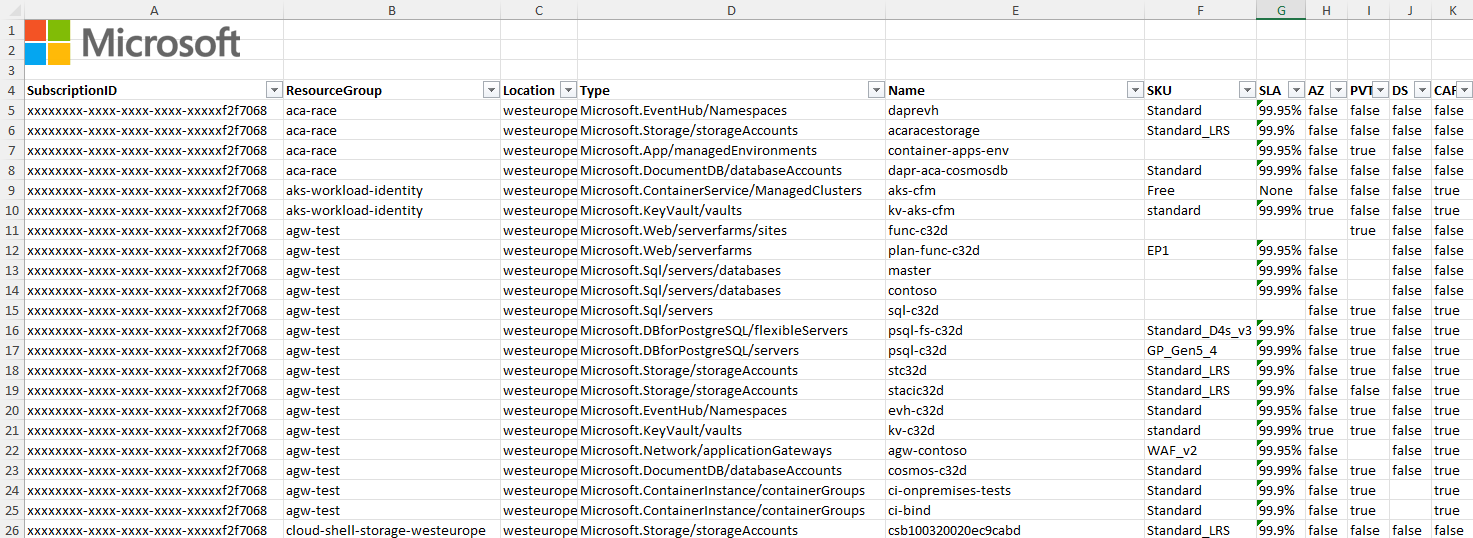
You can expect the following information as a result in the form of an Excel table:

SLA: current expected SLA
Availability Zones: Checks whether the service is protected against zone failures.
Private Endpoints: Checks whether the service uses private endpoints.
Diagnostic Settings: Checks whether diagnostic settings are configured for the service.
CAF naming convention: Checks whether the service conforms to the CAF naming convention.

The Excel table will look like this.
a screenshot of a computer
Azure Quick Review - High Level Assessments 1

Tried it out briefly in my test environment. We download the installation file for Windows from the Github website of this AZQR project. You can find the releases here and the version 2.4.1 here.

Download and execution of Azure Quick Review

You then execute the downloaded file. Before you can do this, you have to register your Powershell session with Azure. The easiest way to do this is with this command.

az login --scope https://management.core.windows.net//.default

Now you can generate the report. Use the following command “azqr-windows-latest-amd64.exe -s /. The command below is for my test subscription ID, so you have to change it.

azqr-windows-latest-amd64.exe -s /613874b9-8e33-449a-b9be-aa82d4de0631

In the following you can see the fast process.

a screenshot of a computer
Animated GIF AZQR Report 1024×630

Output of the Azure Quick Review

The report from my test environment from Azure Quick Review is of course not very meaningful.

AZQR Excel Report
AZQR Excel Report


SKU: Stock Keeping Unit – These are article numbers and are often used in the Azure environment to denote variants / different sizes / different performance of products.
SLA: SLA for the instance in the current configuration. Service Level Agreement, i.e. the service level promised by the supplier (availability / response times / …).
AZ: True, if the instance supports Availability Zone
PVT: True if the instance has a private IP address.
DS: True if diagnostic settings are enabled for the instance.
CAF: True if the instance is compatible with the Cloud Adoption Framework naming convention.

Access the German version to this solution with new features here and learn about the 5 Why’s here.

Avatar for Andreas Hartig
Andreas Hartig - MVP - Cloud and Datacenter Management, Microsoft Azure

Related Posts

Stay Hydrated Drink enoughv2

GPO Central Store – Help! My PolicyDefinitions Folder is missing

Your PolicyDefinitions Folder is missing? The GPO Central Store is key for Managing Group Policy Objects (GPOs) across multiple domain controllers can introduce configuration drift if administrative templates are not…

Read more
A single control plane for LAPS using AzureArc

Legacy LAPS vs. Windows LAPS vs. LAPS for Azure Arc

LAPS for Azure Arc is the new shining star, after for years, IT teams relied on the classic, legacy Microsoft LAPS tool. Microsoft then integrated Windows LAPS directly into the…

Read more
Windows Server Summit 2026 Day 3 Dragons

Windows Server Summit 2026 Day 3

Introduction to Windows Server Summit 2026 Day 3 The final day of the Windows Server Summit 2026 shifted the spotlight from overarching hybrid control planes toward core infrastructure, protocol modernization,…

Read more
Azure Arc Agent 1.54 Stuck IT System Engineer Dragon concerned

Azure Arc Agent 1.54 Stuck? Fixing the WSUS Deadlock and Moving to 1.6x

Is your Azure Arc Agent 1.54 stuck and not updating? If that is the case you are in trouble. Azure Arc enabled servers operate on a strict twelve month support…

Read more
IT operations dragon and the IT System Engineer dragon looking at a whiteboard showing Why Windows Server 2025 and WSUS are fine

Azure Arc – Enable Azure Arc Auto Updates using WSUS and GPOs

While our first part focused on the cloud-native way using Azure Portal and Policy, many IT administrators still prefer or require the reliability of on-premises control. In a traditional IT…

Read more
Azure Arc Enable Azure Arc Auto Updates using Azure Portal

Azure Arc – Enable Azure Arc Auto Updates using Azure Portal

Azure Arc Auto Updates is key, as the foundation of your hybrid cloud strategy and it’s single contral plane in Azure is the Connected Machine Agent. While we often focus…

Read more